
 wx.DC
A wx.DC is a “device context” onto which graphics and text can be drawn.
It is intended to represent different output devices and offers a common abstract API for drawing on any of them.
wx.DC also provides functions for coordinate transformation and computing text metrics and extends that are inherited from its base class wx.ReadOnlyDC.
wxWidgets offers an alternative drawing API based on the modern drawing backends GDI+, CoreGraphics, Cairo and Direct2D. See wx.GraphicsContext, wx.GraphicsRenderer and related classes. There is also a wx.GCDC linking the APIs by offering the wx.DC API on top of a wx.GraphicsContext.
wx.DC is an abstract base class and cannot be created directly. Use wx.PaintDC for drawing on screen, wx.MemoryDC for off-screen drawing or wx.PrinterDC for printing (the remaining drawing contexts wx.ClientDC, wx.WindowDC and wx.ScreenDC are deprecated and don’t work on all platforms any longer). Notice that wx.PaintDC uses the window font and colours by default (starting with wxWidgets 2.9.0) but the other device context classes use system-default values so you always must set the appropriate fonts and colours before using them.
In addition to the classes listed above, you can use InfoDC which can only provide information about the device context but not draw on it. This class is useful when you need a device context associated with a window outside of the paint event handler, i.e. when wx.PaintDC can’t be used.
In addition to the versions of the methods documented below, there are also versions which accept single wx.Point parameter instead of the two int ones or wx.Point and wx.Size instead of the four int parameters.
In wxWidgets 3.3.0 the new wx.ReadOnlyDC class was extracted from wx.DC: it contains all the functions that don’t actually draw on the device context, but just return information about it. This class should be rarely used directly, but some function that used to take wx.DC argument but didn’t need to modify it, now accept wx.ReadOnlyDC instead to make this fact explicit, and such functions can now also be called with InfoDC objects as arguments.
Although copying wx.DC objects is not allowed because it wouldn’t make sense, objects of DC-derived classes can be moved, in C++ sense, allowing to return them from functions since wxWidgets 3.3.2.
Device and logical units
In the wx.DC context there is a distinction between logical units and device units. Device units are the units native to the particular device; e.g. for a screen, a device unit is a pixel. For a printer, the device unit is defined by the resolution of the printer (usually given in DPI: dot-per-inch). All wx.DC functions use instead logical units, unless where explicitly stated. Logical units are arbitrary units mapped to device units using the current mapping mode (see wx.DC.SetMapMode ). This mechanism allows reusing the same code which prints on e.g. a window on the screen to print on e.g. a paper.
Support for Transparency / Alpha Channel
In general wx.DC methods don’t support alpha transparency and the alpha component of wx.Colour is simply ignored and you need to use wx.GraphicsContext for full transparency support. There are, however, a few exceptions: first, under macOS and GTK+ 3 colours with alpha channel are supported in all the normal DC-derived classes as they use wx.GraphicsContext internally. Second, under all platforms wx.SVGFileDC also fully supports alpha channel. In both of these cases the instances of wx.Pen or wx.Brush that are built from wx.Colour use the colour’s alpha values when stroking or filling.
Support for Transformation Matrix
On some platforms (currently under MSW, GTK+ 3, macOS) wx.DC has support for applying an arbitrary affine transformation matrix to its coordinate system (since 3.1.1 this feature is also supported by wx.GCDC in all ports). Call CanUseTransformMatrix to check if this support is available and then call SetTransformMatrix if it is. If the transformation matrix is not supported, SetTransformMatrix always simply returns false and doesn’t do anything. This feature is only available when USE_DC_TRANSFORM_MATRIX build option is enabled.
See also
Device Contexts, wx.GraphicsContext, wx.DCFontChanger, wx.DCTextColourChanger, wx.DCPenChanger, wx.DCBrushChanger, wx.DCClipper
Todo
Precise definition of default/initial state. Pixelwise definition of operations (e.g. last point of a line not drawn).
 Class Hierarchy
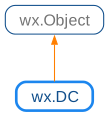
 Known Subclasses
wx.GCDC, wx.MemoryDC, wx.MetafileDC, wx.MirrorDC, OverlayDC , wx.PostScriptDC, wx.PrinterDC, wx.SVGFileDC, wx.ScreenDC, wx.WindowDC
 Methods Summary
Check if automatic bounding box updates are performed. |
|
Copy from a source DC to this DC. |
|
Adds the specified point to the bounding box which can be retrieved with |
|
Clears the device context using the current background brush. |
|
Copy attributes from another DC. |
|
Displays a cross hair using the current pen. |
|
Destroys the current clipping region so that none of the DC is clipped. |
|
Disable automatic bounding box updates. |
|
Draws an arc from the given start to the given end point. |
|
Draw a bitmap on the device context at the specified point. |
|
Draws a check mark inside the given rectangle. |
|
Draws a circle with the given centre and radius. |
|
Draws an ellipse contained in the rectangle specified either with the given top left corner and the given size or directly. |
|
Draw a list of ellipses as quickly as possible. |
|
Draws an arc of an ellipse. |
|
Draw an icon on the display (does nothing if the device context is PostScript). |
|
Draw optional bitmap and the text into the given rectangle and aligns it as specified by alignment parameter; it also will emphasize the character with the given index if it is != -1 and return the bounding rectangle if required. |
|
Draws a line from the first point to the second. |
|
Draw a list of lines as quickly as possible. |
|
This method uses a list of Points, adding the optional offset coordinate. |
|
Implementation of DrawLines that can use numpy arrays, or anything else that uses the |
|
Draws a point using the color of the current pen. |
|
Draw a list of points as quickly as possible. |
|
This method draws a filled polygon using a list of Points, adding the optional offset coordinate. |
|
Draw a list of polygons, each of which is a list of points. |
|
Draws a rectangle with the given corner coordinate and size. |
|
Draw a list of rectangles as quickly as possible. |
|
Draws the text rotated by angle degrees (positive angles are counterclockwise; the full angle is 360 degrees). |
|
Draws a rectangle with the given top left corner, and with the given size. |
|
This is an overloaded member function, provided for convenience. It differs from the above function only in what argument(s) it accepts. |
|
Draws a text string at the specified point, using the current text font, and the current text foreground and background colours. |
|
Draw a list of strings using a list of coordinants for positioning each string. |
|
Ends a document (only relevant when outputting to a printer). |
|
Ends a document page (only relevant when outputting to a printer). |
|
Flood fills the device context starting from the given point, using the current brush colour, and using a style |
|
If supported by the platform and the type of DC, fetch the contents of the DC, or a subset of it, as a bitmap. |
|
Gets the brush used for painting the background. |
|
Returns the current background mode: |
|
GetBoundingBox() . (x1,y1, x2,y2) |
|
Gets the current brush. |
|
Gets the rectangle surrounding the current clipping region. |
|
Returns the rectangle surrounding the current clipping region as a wx.Rect. |
|
If supported by the platform and the ` wx.DC ` implementation, this method will return the ` wx.GraphicsContext ` associated with the DC. |
|
Returns a value that can be used as a handle to the native drawing context, if this wx.DC has something that could be thought of in that way. |
|
Gets the current logical function. |
|
Return the dimensions of the given string’s text extent using the |
|
Gets the current pen. |
|
Gets the colour at the specified location on the DC. |
|
Gets the current text background colour. |
|
Return the dimensions of the given string’s text extent using the |
|
Gets the current text foreground colour. |
|
Fill the area specified by rect with a radial gradient, starting from initialColour at the centre of the circle and fading to destColour on the circle outside. |
|
Fill the area specified by rect with a linear gradient, starting from initialColour and eventually fading to destColour. |
|
Gets the maximum horizontal extent used in drawing commands so far. |
|
Gets the maximum vertical extent used in drawing commands so far. |
|
Gets the minimum horizontal extent used in drawing commands so far. |
|
Gets the minimum vertical extent used in drawing commands so far. |
|
Resets the bounding box: after a call to this function, the bounding box doesn’t contain anything. |
|
Sets the current background brush for the DC. |
|
Change the current background mode. |
|
Sets the current brush for the DC. |
|
Sets the clipping region for this device context to the intersection of the given region described by the parameters of this method and the previously set clipping region. |
|
Sets the clipping region for this device context. |
|
Associate a wx.GraphicsContext with the DC. |
|
Sets the current logical function for the device context. |
|
If this is a window DC or memory DC, assigns the given palette to the window or bitmap associated with the DC. |
|
Sets the current pen for the DC. |
|
Sets the current text background colour for the DC. |
|
Sets the current text foreground colour for the DC. |
|
Starts a document (only relevant when outputting to a printer). |
|
Starts a document page (only relevant when outputting to a printer). |
|
Copy from a source DC to this DC possibly changing the scale. |
|
 Properties Summary
See |
|
See |
|
See |
|
See |
|
See |
|
See |
|
See |
|
See |
|
See |
|
See |
|
See |
|
See |
|
See |
|
See |
|
See |
 Class API
- class wx.DC(ReadOnlyDC)
A DC is a “device context” onto which graphics and text can be drawn.
Methods
- AreAutomaticBoundingBoxUpdatesEnabled(self)
Check if automatic bounding box updates are performed.
Returns
Trueif the automatic bounding box updates are enabled (this is the default) orFalseif they are disabled.- Return type:
bool
Added in version 4.3/wxWidgets-3.3.2.
See also
- Blit(self, xdest, ydest, width, height, source, xsrc, ysrc, logicalFunc=COPY, useMask=False, xsrcMask=DefaultCoord, ysrcMask=DefaultCoord)
Copy from a source DC to this DC.
With this method you can specify the destination coordinates and the size of area to copy which will be the same for both the source and target DCs. If you need to apply scaling while copying, use
StretchBlit.Notice that source DC coordinates xsrc and ysrc are interpreted using the current source DC coordinate system, i.e. the scale, origin position and axis directions are taken into account when transforming them to physical (pixel) coordinates.
- Parameters:
xdest (int) – Destination device context x position.
ydest (int) – Destination device context y position.
width (int) – Width of source area to be copied.
height (int) – Height of source area to be copied.
source (wx.DC) – Source device context.
xsrc (int) – Source device context x position.
ysrc (int) – Source device context y position.
logicalFunc (RasterOperationMode) – Logical function to use, see
SetLogicalFunction.useMask (bool) – If
True, Blit does a transparent blit using the mask that is associated with the bitmap selected into the source device context. The Windows implementation does the following if MaskBlt cannot be used:Creates a temporary bitmap and copies the destination area into it.
Copies the source area into the temporary bitmap using the specified logical function.
Sets the masked area in the temporary bitmap to
wx.BLACKby ANDing the mask bitmap with the temp bitmap with the foreground colour set towx.WHITEand the bg colour set towx.BLACK.Sets the unmasked area in the destination area to
wx.BLACKby ANDing the mask bitmap with the destination area with the foreground colour set towx.BLACKand the background colour set towx.WHITE.ORs the temporary bitmap with the destination area.
Deletes the temporary bitmap.
This sequence of operations ensures that the source’s transparent area need not be black, and logical functions are supported.
Note: on Windows, blitting with masks can be speeded up considerably by compiling wxWidgets with the
USE_DC_CACHEINGoption enabled. You can also influence whether MaskBlt or the explicit mask blitting code above is used, by using wx.SystemOptions and setting theno-maskbltoption to 1.xsrcMask (int) – Source x position on the mask. If both xsrcMask and ysrcMask are
-1, xsrc and ysrc will be assumed for the mask source position. Currently only implemented on Windows.ysrcMask (int) – Source y position on the mask. If both xsrcMask and ysrcMask are
-1, xsrc and ysrc will be assumed for the mask source position. Currently only implemented on Windows.
- Return type:
bool
Note
There is partial support for
Blitin wx.PostScriptDC, under X.See also
- CalcBoundingBox(self, x, y)
Adds the specified point to the bounding box which can be retrieved with
MinX,MaxXandMinY,MaxYfunctions.- Parameters:
x (int)
y (int)
- Return type:
None
See also
- Clear(self)
Clears the device context using the current background brush.
Note that
SetBackgroundmethod must be used to set the brush used byClear, the brush used for filling the shapes set bySetBrushis ignored by it.If no background brush was set, solid white brush is used to clear the device context.
- Return type:
None
- CopyAttributes(self, dc)
Copy attributes from another DC.
The copied attributes currently are:
Font
Text foreground and background colours
Background brush
Layout direction
Note that the scaling factor is not considered to be an attribute of wx.DC and is not copied by this function.
- CrossHair(self, *args, **kw)
 Overloaded Implementations:
CrossHair (self, x, y)
Displays a cross hair using the current pen.
This is a vertical and horizontal line the height and width of the window, centred on the given point.
- Parameters:
x (int)
y (int)
- Return type:
None
CrossHair (self, pt)
This is an overloaded member function, provided for convenience. It differs from the above function only in what argument(s) it accepts.
- Parameters:
pt (wx.Point)
- Return type:
None
- DestroyClippingRegion(self)
Destroys the current clipping region so that none of the DC is clipped.
- Return type:
None
See also
- DisableAutomaticBoundingBoxUpdates(self)
Disable automatic bounding box updates.
Such updates are enabled by default but can be disabled to make the drawing functions slightly faster.
- Return type:
None
Added in version 4.3/wxWidgets-3.3.2.
- DrawArc(self, *args, **kw)
- Overloaded Implementations:
DrawArc (self, xStart, yStart, xEnd, yEnd, xc, yc)
Draws an arc from the given start to the given end point.
The arc drawn is an arc of the circle centered at ( xc, yc). Its start point is (xStart, yStart) whereas its end point is the point of intersection of the line passing by (xc, yc) and (xEnd, yEnd) with the circle passing by (xStart, yStart).
The arc is drawn in a counter-clockwise direction between the start and the end points.
The current pen is used for the outline and the current brush for filling the shape. Notice that unless the brush is transparent, the lines connecting the centre of the circle to the end points of the arc are drawn as well.
- Parameters:
xStart (int)
yStart (int)
xEnd (int)
yEnd (int)
xc (int)
yc (int)
- Return type:
None
Note
DrawEllipticArchas more clear semantics and it is recommended to use it instead of this function.DrawArc (self, ptStart, ptEnd, centre)
This is an overloaded member function, provided for convenience. It differs from the above function only in what argument(s) it accepts.
- DrawBitmap(self, *args, **kw)
- Overloaded Implementations:
DrawBitmap (self, bitmap, x, y, useMask=False)
Draw a bitmap on the device context at the specified point.
If useMask is
Trueand the bitmap has a transparency mask, the bitmap will be drawn transparently.When drawing a mono-bitmap, the current text foreground colour will be used to draw the foreground of the bitmap (all bits set to 1), and the current text background colour to draw the background (all bits set to 0).
- Parameters:
bitmap (wx.Bitmap)
x (int)
y (int)
useMask (bool)
- Return type:
None
See also
DrawBitmap (self, bmp, pt, useMask=False)
This is an overloaded member function, provided for convenience. It differs from the above function only in what argument(s) it accepts.
- DrawCheckMark(self, *args, **kw)
- Overloaded Implementations:
DrawCheckMark (self, x, y, width, height)
Draws a check mark inside the given rectangle.
- Parameters:
x (int)
y (int)
width (int)
height (int)
- Return type:
None
DrawCheckMark (self, rect)
This is an overloaded member function, provided for convenience. It differs from the above function only in what argument(s) it accepts.
- Parameters:
rect (wx.Rect)
- Return type:
None
- DrawCircle(self, *args, **kw)
- Overloaded Implementations:
DrawCircle (self, x, y, radius)
Draws a circle with the given centre and radius.
- Parameters:
x (int)
y (int)
radius (int)
- Return type:
None
See also
DrawCircle (self, pt, radius)
This is an overloaded member function, provided for convenience. It differs from the above function only in what argument(s) it accepts.
- Parameters:
pt (wx.Point)
radius (int)
- Return type:
None
- DrawEllipse(self, *args, **kw)
- Overloaded Implementations:
DrawEllipse (self, x, y, width, height)
Draws an ellipse contained in the rectangle specified either with the given top left corner and the given size or directly.
The current pen is used for the outline and the current brush for filling the shape.
- Parameters:
x (int)
y (int)
width (int)
height (int)
- Return type:
None
See also
DrawEllipse (self, pt, size)
This is an overloaded member function, provided for convenience. It differs from the above function only in what argument(s) it accepts.
DrawEllipse (self, rect)
This is an overloaded member function, provided for convenience. It differs from the above function only in what argument(s) it accepts.
- Parameters:
rect (wx.Rect)
- Return type:
None
- DrawEllipseList(self, ellipses, pens=None, brushes=None)
Draw a list of ellipses as quickly as possible.
- Parameters:
ellipses – A sequence of 4-element sequences representing each ellipse to draw, (x,y, w,h).
pens – If None, then the current pen is used. If a single pen then it will be used for all ellipses. If a list of pens then there should be one for each ellipse in ellipses.
brushes – A brush or brushes to be used to fill the ellipses, with similar semantics as the pens parameter.
- DrawEllipticArc(self, *args, **kw)
- Overloaded Implementations:
DrawEllipticArc (self, x, y, width, height, start, end)
Draws an arc of an ellipse.
The current pen is used for drawing the arc and the current brush is used for drawing the pie.
x and y specify the x and y coordinates of the upper-left corner of the rectangle that contains the ellipse.
width and height specify the width and height of the rectangle that contains the ellipse.
start and end specify the end points of the arc relative to the three-o’clock position from the center of the rectangle. Angles are specified in degrees with 0 degree angle corresponding to the positive horizontal axis (3 o’clock) direction.
Independently of whether start is greater than or less than end, the arc is drawn in the counter-clockwise direction. Also, if start is equal to end, a complete ellipse is drawn.
Notice that unlike
DrawArc, this function does not draw the lines to the arc ends, even when using non-transparent brush.- Parameters:
x (int)
y (int)
width (int)
height (int)
start (float)
end (float)
- Return type:
None
DrawEllipticArc (self, pt, sz, sa, ea)
This is an overloaded member function, provided for convenience. It differs from the above function only in what argument(s) it accepts.
- DrawIcon(self, *args, **kw)
- Overloaded Implementations:
DrawIcon (self, icon, x, y)
Draw an icon on the display (does nothing if the device context is PostScript).
This can be the simplest way of drawing bitmaps on a window.
- Parameters:
icon (wx.Icon)
x (int)
y (int)
- Return type:
None
DrawIcon (self, icon, pt)
This is an overloaded member function, provided for convenience. It differs from the above function only in what argument(s) it accepts.
- DrawLabel(self, *args, **kw)
- Overloaded Implementations:
DrawLabel (self, text, bitmap, rect, alignment=ALIGN_LEFT|ALIGN_TOP, indexAccel=-1)
Draw optional bitmap and the text into the given rectangle and aligns it as specified by alignment parameter; it also will emphasize the character with the given index if it is != -1 and return the bounding rectangle if required.
- Parameters:
- Return type:
DrawLabel (self, text, rect, alignment=ALIGN_LEFT|ALIGN_TOP, indexAccel=-1)
This is an overloaded member function, provided for convenience. It differs from the above function only in what argument(s) it accepts.
- Parameters:
text (string)
rect (wx.Rect)
alignment (int)
indexAccel (int)
- Return type:
None
- DrawLine(self, *args, **kw)
- Overloaded Implementations:
DrawLine (self, x1, y1, x2, y2)
Draws a line from the first point to the second.
The current pen is used for drawing the line. Note that the point (x2, y2) is not part of the line and is not drawn by this function (this is consistent with the behaviour of many other toolkits).
- Parameters:
x1 (int)
y1 (int)
x2 (int)
y2 (int)
- Return type:
None
DrawLine (self, pt1, pt2)
This is an overloaded member function, provided for convenience. It differs from the above function only in what argument(s) it accepts.
- DrawLineList(self, lines, pens=None)
Draw a list of lines as quickly as possible.
- Parameters:
lines – A sequence of 4-element sequences representing each line to draw, (x1,y1, x2,y2).
pens – If None, then the current pen is used. If a single pen then it will be used for all lines. If a list of pens then there should be one for each line in lines.
- DrawLines(self, points, xoffset=0, yoffset=0)
This method uses a list of Points, adding the optional offset coordinate.
The programmer is responsible for deleting the list of points.
- DrawLinesFromBuffer(self, pyBuff)
Implementation of DrawLines that can use numpy arrays, or anything else that uses the python buffer protocol directly without any element conversion. This provides a significant performance increase over the standard DrawLines function.
The pyBuff argument needs to provide an array of C integers organized as x, y point pairs. The size of a C integer is platform dependent. With numpy, the intc data type will provide the appropriate element size.
If called with an object that doesn’t support the python buffer protocol, or if the underlying element size does not match the size of a C integer, a TypeError exception is raised. If the buffer provided has float data with the same element size as a C integer, no error will be raised, but the lines will not be drawn in the appropriate places.
- Parameters:
pyBuff – A python buffer containing integer pairs
- DrawPoint(self, *args, **kw)
- Overloaded Implementations:
DrawPoint (self, x, y)
Draws a point using the color of the current pen.
Note that the other properties of the pen are not used, such as width.
- Parameters:
x (int)
y (int)
- Return type:
None
DrawPoint (self, pt)
This is an overloaded member function, provided for convenience. It differs from the above function only in what argument(s) it accepts.
- Parameters:
pt (wx.Point)
- Return type:
None
- DrawPointList(self, points, pens=None)
Draw a list of points as quickly as possible.
- Parameters:
points – A sequence of 2-element sequences representing each point to draw, (x,y).
pens – If None, then the current pen is used. If a single pen then it will be used for all points. If a list of pens then there should be one for each point in points.
- DrawPolygon(self, points, xoffset=0, yoffset=0, fill_style=ODDEVEN_RULE)
This method draws a filled polygon using a list of Points, adding the optional offset coordinate.
The first and last points are automatically closed.
The last argument specifies the fill rule:
wx.ODDEVEN_RULE(the default) orwx.WINDING_RULE.The current pen is used for drawing the outline, and the current brush for filling the shape. Using a transparent brush suppresses filling.
The programmer is responsible for deleting the list of points.
- DrawPolygonList(self, polygons, pens=None, brushes=None)
Draw a list of polygons, each of which is a list of points.
- Parameters:
polygons – A sequence of sequences of sequences. [[(x1,y1),(x2,y2),(x3,y3)…], [(x1,y1),(x2,y2),(x3,y3)…]]
pens – If None, then the current pen is used. If a single pen then it will be used for all polygons. If a list of pens then there should be one for each polygon.
brushes – A brush or brushes to be used to fill the polygons, with similar semantics as the pens parameter.
- DrawRectangle(self, *args, **kw)
- Overloaded Implementations:
DrawRectangle (self, x, y, width, height)
Draws a rectangle with the given corner coordinate and size.
Normally, x and y specify the top left corner coordinates and both width and height are positive, however they are also allowed to be negative, in which case the corresponding corner coordinate refers to the right or bottom corner instead.
The current pen is used for the outline and the current brush for filling the shape. Special case: If the current pen is transparent, then the current brush is used for the entire rectangle.
- Parameters:
x (int)
y (int)
width (int)
height (int)
- Return type:
None
DrawRectangle (self, pt, sz)
This is an overloaded member function, provided for convenience. It differs from the above function only in what argument(s) it accepts.
DrawRectangle (self, rect)
This is an overloaded member function, provided for convenience. It differs from the above function only in what argument(s) it accepts.
- Parameters:
rect (wx.Rect)
- Return type:
None
- DrawRectangleList(self, rectangles, pens=None, brushes=None)
Draw a list of rectangles as quickly as possible.
- Parameters:
rectangles – A sequence of 4-element sequences representing each rectangle to draw, (x,y, w,h).
pens – If None, then the current pen is used. If a single pen then it will be used for all rectangles. If a list of pens then there should be one for each rectangle in rectangles.
brushes – A brush or brushes to be used to fill the rectagles, with similar semantics as the pens parameter.
- DrawRotatedText(self, *args, **kw)
- Overloaded Implementations:
DrawRotatedText (self, text, x, y, angle)
Draws the text rotated by angle degrees (positive angles are counterclockwise; the full angle is 360 degrees).
Notice that, as with
DrawText, the text can contain multiple lines separated by the new line ('\n') characters.- Parameters:
text (string)
x (int)
y (int)
angle (float)
- Return type:
None
Note
Under MSW only TrueType fonts can be drawn by this function. In particular, a font different from
NORMAL_FONTshould be used as the latter is not a TrueType font.SWISS_FONTis an example of a font which is.See also
DrawRotatedText (self, text, point, angle)
This is an overloaded member function, provided for convenience. It differs from the above function only in what argument(s) it accepts.
- Parameters:
text (string)
point (wx.Point)
angle (float)
- Return type:
None
- DrawRoundedRectangle(self, *args, **kw)
- Overloaded Implementations:
DrawRoundedRectangle (self, x, y, width, height, radius)
Draws a rectangle with the given top left corner, and with the given size.
The corners are quarter-circles using the given radius. The current pen is used for the outline and the current brush for filling the shape.
If radius is positive, the value is assumed to be the radius of the rounded corner. If radius is negative, the absolute value is assumed to be the proportion of the smallest dimension of the rectangle. This means that the corner can be a sensible size relative to the size of the rectangle, and also avoids the strange effects X produces when the corners are too big for the rectangle.
- Parameters:
x (int)
y (int)
width (int)
height (int)
radius (float)
- Return type:
None
DrawRoundedRectangle (self, pt, sz, radius)
This is an overloaded member function, provided for convenience. It differs from the above function only in what argument(s) it accepts.
DrawRoundedRectangle (self, rect, radius)
This is an overloaded member function, provided for convenience. It differs from the above function only in what argument(s) it accepts.
- Parameters:
rect (wx.Rect)
radius (float)
- Return type:
None
- DrawSpline(self, *args, **kw)
- Overloaded Implementations:
DrawSpline (self, points)
This is an overloaded member function, provided for convenience. It differs from the above function only in what argument(s) it accepts.
DrawSpline (self, x1, y1, x2, y2, x3, y3)
This is an overloaded member function, provided for convenience. It differs from the above function only in what argument(s) it accepts.
- DrawText(self, *args, **kw)
- Overloaded Implementations:
DrawText (self, text, x, y)
Draws a text string at the specified point, using the current text font, and the current text foreground and background colours.
The coordinates refer to the top-left corner of the rectangle bounding the string. See
GetTextExtentfor how to get the dimensions of a text string, which can be used to position the text more precisely andDrawLabelif you need to align the string differently.Starting from wxWidgets 2.9.2 text parameter can be a multi-line string, i.e. contain new line characters, and will be rendered correctly.
- Parameters:
text (string)
x (int)
y (int)
- Return type:
None
Note
The current logical function is ignored by this function.
DrawText (self, text, pt)
This is an overloaded member function, provided for convenience. It differs from the above function only in what argument(s) it accepts.
- Parameters:
text (string)
pt (wx.Point)
- Return type:
None
- DrawTextList(self, textList, coords, foregrounds=None, backgrounds=None)
Draw a list of strings using a list of coordinants for positioning each string.
- Parameters:
NOTE: Make sure you set background mode to wx.Solid (DC.SetBackgroundMode)If you want backgrounds to do anything.
- EndDoc(self)
Ends a document (only relevant when outputting to a printer).
- Return type:
None
- EndPage(self)
Ends a document page (only relevant when outputting to a printer).
- Return type:
None
- FloodFill(self, *args, **kw)
- Overloaded Implementations:
FloodFill (self, x, y, colour, style=FLOOD_SURFACE)
Flood fills the device context starting from the given point, using the current brush colour, and using a style:
wx.FLOOD_SURFACE: The flooding occurs until a colour other than the given colour is encountered.wx.FLOOD_BORDER: The area to be flooded is bounded by the given colour.
Currently this method is not implemented in wxOSX and does nothing there.
- Parameters:
x (int)
y (int)
colour (wx.Colour)
style (FloodFillStyle)
- Return type:
bool
- Returns:
Falseif the operation failed.
Note
The present implementation for non-Windows platforms may fail to find colour borders if the pixels do not match the colour exactly. However the function will still return
True.Note
This method shouldn’t be used with wx.PaintDC under non-Windows platforms as it uses
GetPixelinternally and this may give wrong results, notably in wxGTK. If you need to flood fill wx.PaintDC, create a temporary wx.MemoryDC, flood fill it and then blit it to, or draw as a bitmap on, wx.PaintDC. See the example of doing this in the drawing sample and wx.BufferedPaintDC class.FloodFill (self, pt, col, style=FLOOD_SURFACE)
This is an overloaded member function, provided for convenience. It differs from the above function only in what argument(s) it accepts.
- Parameters:
pt (wx.Point)
col (wx.Colour)
style (FloodFillStyle)
- Return type:
bool
- GetAsBitmap(self, subrect=nullptr)
If supported by the platform and the type of DC, fetch the contents of the DC, or a subset of it, as a bitmap.
- GetBackground(self)
Gets the brush used for painting the background.
- Return type:
See also
- GetBackgroundMode(self)
Returns the current background mode:
BRUSHSTYLE_SOLIDorBRUSHSTYLE_TRANSPARENT.- Return type:
int
See also
- GetBoundingBox(self)
Returns the min and max points used in drawing commands so far.
- GetBrush(self)
Gets the current brush.
- Return type:
See also
- GetCGContext(self)
- Return type:
wx.UIntPtr
- GetClippingBox(self)
Gets the rectangle surrounding the current clipping region.
If no clipping region is set this function returns the extent of the device context.
- Return type:
Tuple[bool, int, int, int, int]
- Returns:
Trueif there is a clipping region orFalseif there is no active clipping region (note that this return value is available only since wxWidgets 3.1.2, this function didn’t return anything in the previous versions).
Note
Clipping region is given in logical coordinates.
- GetClippingRect(self)
Returns the rectangle surrounding the current clipping region as a wx.Rect.
- GetGdkDrawable(self)
- Return type:
wx.UIntPtr
- GetGraphicsContext(self)
If supported by the platform and the ` wx.DC ` implementation, this method will return the ` wx.GraphicsContext ` associated with the DC.
Otherwise nullptr is returned.
- Return type:
- GetHDC(self)
- Return type:
int
- GetHandle(self)
Returns a value that can be used as a handle to the native drawing context, if this wx.DC has something that could be thought of in that way.
(Not all of them do.)
For example, on Windows the return value is an
HDC, on macOS it is a CGContextRef and on wxGTK it will be a GdkDrawable. If the DC is a wx.GCDC then the return value will be the value returned fromwx.GraphicsContext.GetNativeContext. A value of nullptr is returned if the DC does not have anything that fits the handle concept.- Return type:
wx.UIntPtr
Added in version 2.9.5.
- GetLogicalFunction(self)
Gets the current logical function.
- Return type:
See also
- GetMultiLineTextExtent(self, st)
Return the dimensions of the given string’s text extent using the currently selected font, taking into account multiple lines if present in the string.
- Parameters:
st – The string to be measured
See also
- Return type:
- GetPixel(self, x, y)
Gets the colour at the specified location on the DC.
This method isn’t available for
wx.PostScriptDCorwx.MetafileDCnor for any DC in wxOSX port, and simply returnswx.NullColourthere.Note
Setting a pixel can be done using DrawPoint().
Note
This method shouldn’t be used with
wx.PaintDCas accessing the DC while drawing can result in unexpected results, notably in wxGTK.- Return type:
- GetTextBackground(self)
Gets the current text background colour.
- Return type:
See also
- GetTextExtent(self, st)
Return the dimensions of the given string’s text extent using the currently selected font.
- Parameters:
st – The string to be measured
See also
- Return type:
- GetTextForeground(self)
Gets the current text foreground colour.
- Return type:
See also
- GradientFillConcentric(self, *args, **kw)
- Overloaded Implementations:
GradientFillConcentric (self, rect, initialColour, destColour)
Fill the area specified by rect with a radial gradient, starting from initialColour at the centre of the circle and fading to destColour on the circle outside.
The circle is placed at the centre of rect.
Note
Currently this function is very slow, don’t use it for real-time drawing.
GradientFillConcentric (self, rect, initialColour, destColour, circleCenter)
Fill the area specified by rect with a radial gradient, starting from initialColour at the centre of the circle and fading to destColour on the circle outside.
circleCenter are the relative coordinates of centre of the circle in the specified rect.
- Parameters:
- Return type:
None
Note
Currently this function is very slow, don’t use it for real-time drawing.
- GradientFillLinear(self, rect, initialColour, destColour, nDirection=RIGHT)
Fill the area specified by rect with a linear gradient, starting from initialColour and eventually fading to destColour.
The nDirection specifies the direction of the colour change, default is to use initialColour on the left part of the rectangle and destColour on the right one.
- MaxX(self)
Gets the maximum horizontal extent used in drawing commands so far.
- Return type:
int
- MaxY(self)
Gets the maximum vertical extent used in drawing commands so far.
- Return type:
int
- MinX(self)
Gets the minimum horizontal extent used in drawing commands so far.
- Return type:
int
- MinY(self)
Gets the minimum vertical extent used in drawing commands so far.
- Return type:
int
- ResetBoundingBox(self)
Resets the bounding box: after a call to this function, the bounding box doesn’t contain anything.
- Return type:
None
See also
- SetBackground(self, brush)
Sets the current background brush for the DC.
- Parameters:
brush (wx.Brush)
- Return type:
None
- SetBackgroundMode(self, mode)
Change the current background mode.
This setting determines whether text will be drawn with a background colour or not.
Default is
BRUSHSTYLE_TRANSPARENT, i.e. text background is not drawn.- Parameters:
mode (int) – one of
BRUSHSTYLE_SOLIDandBRUSHSTYLE_TRANSPARENT.- Return type:
None
- SetBrush(self, brush)
Sets the current brush for the DC.
If the argument is
wx.NullBrush(or another invalid brush; seewx.Brush.IsOk), the current brush is selected out of the device context (leaving wx.DC without any valid brush), allowing the current brush to be destroyed safely.- Parameters:
brush (wx.Brush)
- Return type:
None
See also
wx.Brush, wx.MemoryDC (for the interpretation of colours when drawing into a monochrome bitmap)
- SetClippingRegion(self, *args, **kw)
- Overloaded Implementations:
SetClippingRegion (self, x, y, width, height)
Sets the clipping region for this device context to the intersection of the given region described by the parameters of this method and the previously set clipping region.
The clipping region is an area to which drawing is restricted. Possible uses for the clipping region are for clipping text or for speeding up window redraws when only a known area of the screen is damaged.
- Parameters:
x (int)
y (int)
width (int)
height (int)
- Return type:
None
Note
Clipping region should be given in logical coordinates.
Calling this function can only make the clipping region smaller, never larger.
You need to call
DestroyClippingRegionfirst if you want to set the clipping region exactly to the region specified.If resulting clipping region is empty, then all drawing on the DC is clipped out (all changes made by drawing operations are masked out).
See also
SetClippingRegion (self, pt, sz)
This is an overloaded member function, provided for convenience. It differs from the above function only in what argument(s) it accepts.
SetClippingRegion (self, rect)
This is an overloaded member function, provided for convenience. It differs from the above function only in what argument(s) it accepts.
- Parameters:
rect (wx.Rect)
- Return type:
None
- SetDeviceClippingRegion(self, region)
Sets the clipping region for this device context.
Unlike
SetClippingRegion, this function works with physical coordinates and not with the logical ones.- Parameters:
region (wx.Region)
- Return type:
None
- SetGraphicsContext(self, ctx)
Associate a wx.GraphicsContext with the DC.
Ignored if not supported by the specific ` wx.DC ` implementation. It is unlikely that this will need to be used in application code.
- Parameters:
ctx (wx.GraphicsContext)
- Return type:
None
- SetLogicalFunction(self, function)
Sets the current logical function for the device context.
It determines how a source pixel (from a pen or brush colour, or source device context if using
Blit) combines with a destination pixel in the current device context. Text drawing is not affected by this function.See wx.RasterOperationMode enumeration values for more info.
The default is
COPY, which simply draws with the current colour. The others combine the current colour and the background using a logical operation.- Parameters:
function (RasterOperationMode)
- Return type:
None
Note
This function is not fully supported in all ports, due to the limitations of the underlying drawing model. Notably,
INVERTwhich was commonly used for drawing rubber bands or other moving outlines in the past, is not, and will not, be supported byGTK3and Mac. The suggested alternative is to draw temporarily objects normally and refresh the (affected part of the) window to remove them later.
- SetPalette(self, palette)
If this is a window DC or memory DC, assigns the given palette to the window or bitmap associated with the DC.
If the argument is
wx.NullPalette, the current palette is selected out of the device context, and the original palette restored.- Parameters:
palette (wx.Palette)
- Return type:
None
See also
- SetPen(self, pen)
Sets the current pen for the DC.
If the argument is
wx.NullPen(or another invalid pen; seewx.Pen.IsOk), the current pen is selected out of the device context (leaving wx.DC without any valid pen), allowing the current pen to be destroyed safely.- Parameters:
pen (wx.Pen)
- Return type:
None
See also
wx.MemoryDC for the interpretation of colours when drawing into a monochrome bitmap.
- SetTextBackground(self, colour)
Sets the current text background colour for the DC.
- Parameters:
colour (wx.Colour)
- Return type:
None
- SetTextForeground(self, colour)
Sets the current text foreground colour for the DC.
- Parameters:
colour (wx.Colour)
- Return type:
None
See also
wx.MemoryDC for the interpretation of colours when drawing into a monochrome bitmap.
- StartDoc(self, message)
Starts a document (only relevant when outputting to a printer).
message is a message to show while printing.
- Parameters:
message (string)
- Return type:
bool
- StartPage(self)
Starts a document page (only relevant when outputting to a printer).
- Return type:
None
- StretchBlit(self, xdest, ydest, dstWidth, dstHeight, source, xsrc, ysrc, srcWidth, srcHeight, logicalFunc=COPY, useMask=False, xsrcMask=DefaultCoord, ysrcMask=DefaultCoord)
Copy from a source DC to this DC possibly changing the scale.
Unlike
Blit, this method allows specifying different source and destination region sizes, meaning that it can stretch or shrink it while copying. The same can be achieved by changing the scale of the source or target DC but calling this method is simpler and can also be more efficient if the platform provides a native implementation of it.The meaning of its other parameters is the same as with
Blit, in particular all source coordinates are interpreted using the source DC coordinate system, i.e. are affected by its scale, origin translation and axis direction.- Parameters:
xdest (int) – Destination device context x position.
ydest (int) – Destination device context y position.
dstWidth (int) – Width of destination area.
dstHeight (int) – Height of destination area.
source (wx.DC) – Source device context.
xsrc (int) – Source device context x position.
ysrc (int) – Source device context y position.
srcWidth (int) – Width of source area to be copied.
srcHeight (int) – Height of source area to be copied.
logicalFunc (RasterOperationMode) – Logical function to use, see
SetLogicalFunction.useMask (bool) – If
True, Blit does a transparent blit using the mask that is associated with the bitmap selected into the source device context. The Windows implementation does the following if MaskBlt cannot be used:Creates a temporary bitmap and copies the destination area into it.
Copies the source area into the temporary bitmap using the specified logical function.
Sets the masked area in the temporary bitmap to
wx.BLACKby ANDing the mask bitmap with the temp bitmap with the foreground colour set towx.WHITEand the bg colour set towx.BLACK.Sets the unmasked area in the destination area to
wx.BLACKby ANDing the mask bitmap with the destination area with the foreground colour set towx.BLACKand the background colour set towx.WHITE.ORs the temporary bitmap with the destination area.
Deletes the temporary bitmap.
This sequence of operations ensures that the source’s transparent area need not be black, and logical functions are supported.
Note: on Windows, blitting with masks can be speeded up considerably by compiling wxWidgets with the
USE_DC_CACHEINGoption enabled. You can also influence whether MaskBlt or the explicit mask blitting code above is used, by using wx.SystemOptions and setting theno-maskbltoption to 1.xsrcMask (int) – Source x position on the mask. If both xsrcMask and ysrcMask are DefaultCoord, xsrc and ysrc will be assumed for the mask source position. Currently only implemented on Windows.
ysrcMask (int) – Source y position on the mask. If both xsrcMask and ysrcMask are DefaultCoord, xsrc and ysrc will be assumed for the mask source position. Currently only implemented on Windows.
- Return type:
bool
Blitin wx.PostScriptDC, under X.See wx.MemoryDC for typical usage.
Added in version 2.9.0.
See also
- _DrawEllipseList(self, pyCoords, pyPens, pyBrushes)
- Return type:
Any
- _DrawLineList(self, pyCoords, pyPens, pyBrushes)
- Return type:
Any
- _DrawLinesFromBuffer(self, pyBuff)
- Return type:
Any
- _DrawPointList(self, pyCoords, pyPens, pyBrushes)
- Return type:
Any
- _DrawPolygonList(self, pyCoords, pyPens, pyBrushes)
- Return type:
Any
- _DrawRectangleList(self, pyCoords, pyPens, pyBrushes)
- Return type:
Any
- _DrawTextList(self, textList, pyPoints, foregroundList, backgroundList)
- Return type:
Any
- __bool__(self)
- Return type:
bool
- __enter__(self)
- __exit__(self, exc_type, exc_val, exc_tb)
- __nonzero__(self)
- Return type:
bool
Properties
- AsBitmap
See
GetAsBitmap
- Background
See
GetBackgroundandSetBackground
- BackgroundMode
See
GetBackgroundModeandSetBackgroundMode
- BoundingBox
See
GetBoundingBox
- CGContext
See
GetCGContext
- ClippingRect
See
GetClippingRect
- GdkDrawable
See
GetGdkDrawable
- GraphicsContext
See
GetGraphicsContextandSetGraphicsContext
- LogicalFunction
See
GetLogicalFunctionandSetLogicalFunction
- MultiLineTextExtent
- TextBackground
See
GetTextBackgroundandSetTextBackground
- TextExtent
See
GetTextExtent
- TextForeground
See
GetTextForegroundandSetTextForeground
