
 wx.PyApp
The wx.App class represents the application itself when USE_GUI=1 .
In addition to the features provided by wx.AppConsole it keeps track of the top window (see SetTopWindow) and adds support for video modes (see SetDisplayMode).
In general, application-wide settings for GUI-only apps are accessible from wx.App (or from wx.SystemSettings or wx.SystemOptions classes).
 Events Emitted by this Class
Event macros for events emitted by this class:
EVT_QUERY_END_SESSION: Process a query end session event, supplying the member function. See wx.CloseEvent.
EVT_END_SESSION: Process an end session event, supplying the member function. See wx.CloseEvent.
EVT_ACTIVATE_APP: Process a
wxEVT_ACTIVATE_APPevent. See wx.ActivateEvent.EVT_HIBERNATE: Process a hibernate event. See wx.ActivateEvent.
EVT_DIALUP_CONNECTED: A connection with the network was established. See DialUpEvent .
EVT_DIALUP_DISCONNECTED: The connection with the network was lost. See DialUpEvent .
EVT_IDLE: Process a
wxEVT_IDLEevent. See wx.IdleEvent.
See also
App Overview, wx.AppTraits, wx.EventLoopBase, wx.SystemSettings
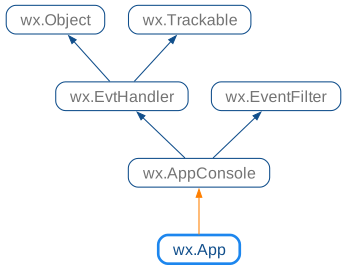
 Class Hierarchy
 Methods Summary
Constructor. |
|
Allows wxWidgets to selectively suppress some GTK messages. |
|
Disables the printing of various GTK messages. |
|
Returns the current mode for how the application responds to asserts. |
|
Returns 400, 470, 471, etc. for comctl32.dll 4.00, 4.70, 4.71 or 0 if |
|
Get display mode that is used use. |
|
Returns |
|
Return the layout direction for the current locale or |
|
Returns a pointer to the top application window if any. |
|
Returns a pointer to the top window. |
|
Returns |
|
Returns |
|
Returns True if the application is able to connect to the system’s |
|
Enable experimental dark mode support for MSW applications. |
|
Hide all application windows just as the user can do with the |
|
Called in response of an “open-application” Apple event. |
|
Called in response of an “open-document” Apple event. |
|
Called in response of an openFiles message. |
|
Called in response of a “get-url” Apple event. |
|
Called in response of a “print-document” Apple event. |
|
Called in response of a “reopen-application” Apple event. |
|
Enable the automatic tabbing features of macOS. |
|
May be overridden to indicate that the application is not a foreground GUI application under macOS. |
|
This function is similar to |
|
Works like |
|
Request using either system default or explicitly light or dark theme for the application. |
|
Set the mode indicating how the application responds to assertion |
|
Set display mode to use. |
|
Allows the programmer to specify whether the application will exit when the top-level frame is deleted. |
|
Allows runtime switching of the UI environment theme. |
|
Sets the ‘top’ window. |
|
Allows the programmer to specify whether the application will use the best visual on systems that support several visual on the same display. |
 Properties Summary
See |
|
See |
|
See |
|
See |
 Class API
- class wx.PyApp(AppConsole)
Possible constructors:
PyApp() -> None
The App class represents the application itself when USE_GUI=1.
Methods
- __init__(self)
Constructor.
Called implicitly with a definition of a wx.App object.
- Return type:
None
- static GTKAllowDiagnosticsControl()
Allows wxWidgets to selectively suppress some GTK messages.
This function can be called to allow wxWidgets to control GTK message logging. You must not call it if your application calls the
g_log_set_writer_func()function itself, as this function can be only called once.It is recommended to call this function in your overridden version of
wx.App.OnInitto allow wxWidgets to suppress some spurious GTK error messages, e.g. the ones that happen whenever wx.Notebook pages are removed with the current GTK versions.- Return type:
None
Added in version 4.2/wxWidgets-3.2.1.
Availability
Only available for GTK.
- static GTKSuppressDiagnostics(flags=-1)
Disables the printing of various GTK messages.
This function can be called to suppress GTK diagnostic messages that are output on the standard error stream by default.
If
WXSUPPRESS_GTK_DIAGNOSTICSenvironment variable is set to a non-zero value, wxWidgets automatically calls this function on program startup with the value of this variable as flags if it’s a number or with the default flags value otherwise.The default value of the argument disables all messages, but you can pass in a mask flag to specifically disable only particular categories of messages.
Note that this function only works when using glib 2.50 (released in September 2016) or later and does nothing with the older versions of the library.
- Parameters:
flags (int) – The mask for the types of messages to suppress. Refer to the glib documentation for the
GLogLevelFlagsenum, which defines the various message types.- Return type:
None
GTK port.
Added in version 4.1/wxWidgets-3.1.6.
Availability
Only available for GTK.
- GetAssertMode(self)
Returns the current mode for how the application responds to asserts.
- Return type:
- static GetComCtl32Version()
Returns 400, 470, 471, etc. for comctl32.dll 4.00, 4.70, 4.71 or 0 if it wasn’t found at all. Raises an exception on non-Windows platforms.
- Return type:
int
- GetDisplayMode(self)
Get display mode that is used use.
This is only used in framebuffer wxWidgets ports such as wxDFB.
- Return type:
- GetExitOnFrameDelete(self)
Returns
Trueif the application will exit when the top-level frame is deleted.- Return type:
bool
See also
- GetLayoutDirection(self)
Return the layout direction for the current locale or
Layout_Defaultif it’s unknown.- Return type:
- static GetMainTopWindow()
Returns a pointer to the top application window if any.
This function is safe to call even before creating, or after destroying, the application object, as it simply returns nullptr if it doesn’t exist. Otherwise it’s equivalent to calling TheApp->
GetTopWindow.- Return type:
Added in version 4.1/wxWidgets-3.1.5.
- GetTopWindow(self)
Returns a pointer to the top window.
- Return type:
Note
If the top window hasn’t been set using
SetTopWindow, this function will find the first top-level window (frame or dialog or instance of wx.TopLevelWindow) from the internal top level window list and return that.See also
- GetUseBestVisual(self)
Returns
Trueif the application will use the best visual on systems that support different visuals,Falseotherwise.- Return type:
bool
See also
- IsActive(self)
Returns
Trueif the application is active, i.e. if one of its windows is currently in the foreground.If this function returns
Falseand you need to attract users attention to the application, you may usewx.TopLevelWindow.RequestUserAttentionto do it.- Return type:
bool
- static IsDisplayAvailable()
Returns True if the application is able to connect to the system’s display, or whatever the equivallent is for the platform.
- Return type:
bool
- MSWEnableDarkMode(self, flags=0, settings=nullptr)
Enable experimental dark mode support for MSW applications.
This function uses undocumented, and unsupported by Microsoft, functions to enable dark mode support for the desktop applications under Windows 10 versions later than v1809 (which includes Windows 10
LTSC2019) and all Windows 11 versions. Please note that dark mode testing under versions of Windows earlier than20H1(i.e. v2004) has been limited, make sure to test your application especially carefully if you target these versions and want to enable dark mode support.Note that dark mode can also be enabled by setting the “msw.dark-mode” system option via an environment variable from outside the application or by calling
SetAppearancewith eitherSystemorDarkparameter.Known limitations of dark mode support include:
Anything based on
TaskDialog()Win32 API doesn’t support dark mode:wx.MessageBox, wx.MessageDialog, wx.RichMessageDialog, wx.ProgressDialog and simple (i.e., without hyperlink or licence)wx.adv.AboutBox. Consider using generic versions (e.g. GenericMessageDialog or wx.GenericProgressDialog) if dark mode support is more important than using the native dialog.The following dialogs wrapping common windows dialogs don’t support dark mode: wx.ColourDialog, wx.FindReplaceDialog, wx.FontDialog, wx.PageSetupDialog, wx.PrintDialog.
wx.adv.TimePickerCtrl, wx.adv.DatePickerCtrl and wx.adv.CalendarCtrl don’t support dark mode and use the same (light) background as by default in it.
Toolbar items for which
wx.ToolBar.SetDropdownMenuwas called don’t draw the menu drop-down correctly, making it almost invisible.
- Parameters:
flags (int) – Can include
App::DarkMode_Alwaysto force enabling dark mode for the application, even if the system doesn’t use the dark mode by default. Otherwise dark mode is only used if it is the default mode for the applications on the current system.settings (wx.DarkModeSettings) – If specified, allows to customize dark mode appearance. Please see wx.DarkModeSettings documentation for more information.
- Return type:
bool
- Returns:
Trueif dark mode support was enabled,Falseif it couldn’t be done, most likely because the system doesn’t support dark mode.
Added in version 4.3/wxWidgets-3.3.0.
Availability
Only available for MSW.
- MacHideApp(self)
Hide all application windows just as the user can do with the system Hide command. Mac only.
- Return type:
None
- MacNewFile(self)
Called in response of an “open-application” Apple event.
Override this to create a new document in your app.
- Return type:
None
Availability
Only available for OSX.
- MacOpenFile(self, fileName)
Called in response of an “open-document” Apple event.
- Parameters:
fileName (string)
- Return type:
None
Deprecated
This function is kept mostly for backwards compatibility. Please override
wx.App.MacOpenFilesmethod instead in any new code.Availability
Only available for OSX.
- MacOpenFiles(self, fileNames)
Called in response of an openFiles message.
You need to override this method in order to open one or more document files after the user double clicked on it or if the files and/or folders were dropped on either the application in the dock or the application icon in Finder.
By default this method calls MacOpenFile for each file/folder.
- Parameters:
fileNames (list of strings)
- Return type:
None
Added in version 2.9.3.
Availability
Only available for OSX.
- MacOpenURL(self, url)
Called in response of a “get-url” Apple event.
- Parameters:
url (string)
- Return type:
None
Availability
Only available for OSX.
- MacPrintFile(self, fileName)
Called in response of a “print-document” Apple event.
- Parameters:
fileName (string)
- Return type:
None
Availability
Only available for OSX.
- MacReopenApp(self)
Called in response of a “reopen-application” Apple event.
- Return type:
None
Availability
Only available for OSX.
- OSXEnableAutomaticTabbing(self, enable)
Enable the automatic tabbing features of macOS.
This feature is native to the operating system. When it is enabled, macOS will automatically place windows inside tabs and show a tab bar in the application. Entries are also added to the View menu to show/hide the tab bar.
- Parameters:
enable (bool)
- Return type:
None
Added in version 4.1/wxWidgets-3.1.4.
Note
Requires macOS 10.12+, does nothing under earlier OS versions.
Availability
Only available for OSX.
- OSXIsGUIApplication(self)
May be overridden to indicate that the application is not a foreground GUI application under macOS.
This method is called during the application startup and returns
Trueby default. In this case, wxWidgets ensures that the application is ran as a foreground, GUI application so that the user can interact with it normally, even if it is not bundled. If this is undesired, i.e. if the application doesn’t need to be brought to the foreground, this method can be overridden to returnFalse.Notice that overriding it doesn’t make any difference for the bundled applications which are always foreground unless
LSBackgroundOnlykey is specified in theInfo.plistfile.- Return type:
bool
Added in version 4.0/wxWidgets-3.0.1.
Availability
Only available for OSX.
- SafeYield(self, win, onlyIfNeeded)
This function is similar to
wx.Yield, except that it disables the user input to all program windows before callingwx.AppConsole.Yieldand re-enables it again afterwards.If win is not nullptr, this window will remain enabled, allowing the implementation of some limited user interaction. Returns the result of the call to
wx.AppConsole.Yield.- Parameters:
win (wx.Window)
onlyIfNeeded (bool)
- Return type:
bool
See also
- SafeYieldFor(self, win, eventsToProcess)
Works like
wx.SafeYieldwith onlyIfNeeded ==Trueexcept that it allows the caller to specify a mask of events to be processed.See
wx.EventLoopBase.YieldForfor more info.- Parameters:
win (wx.Window)
eventsToProcess (long)
- Return type:
bool
- SetAppearance(self, appearance)
Request using either system default or explicitly light or dark theme for the application.
Under GTK and macOS applications use the system default appearance by default, and so it is only useful to call this function with either
wx.PyApp.Appearance.Lightorwx.PyApp.Appearance.Darkparameters if you need to override the default system appearance. The effect of calling this function is immediate, i.e. this function returnswx.PyApp.AppearanceResult.Ok, and affects all the existing windows as well as any windows created after this call.Under MSW, the default appearance is always light and the applications that want to follow the system appearance need to explicitly call this function with
wx.PyApp.Appearance.Systemparameter in order to do it. Please note using dark appearance under MSW requires using non-documented system functions and has several known limitations, please seeMSWEnableDarkModefor more details. Also, on this platform the appearance can be only set before any windows are created and calling this function too late will returnwx.PyApp.AppearanceResult.CannotChange.Note that to query the current appearance, you can use wx.SystemAppearance, see
wx.SystemSettings.GetAppearance.- Parameters:
appearance (Appearance)
- Return type:
- Returns:
wx.PyApp.AppearanceResult.Okif the appearance was successfully changed or had been already set to the requested value,wx.PyApp.AppearanceResult.CannotChangeif the appearance can’t be changed any more because it’s too late to do it but could be changed if done immediately on next program launch (only returned by wxMSW currently) orwx.PyApp.AppearanceResult.Failureif changing the appearance failed for some other reason, e.g. becauseGTK_THEMEis defined when using wxGTK of this function is not implemented at all for the current platform.
Added in version 4.3/wxWidgets-3.3.0.
- SetAssertMode(self, wxAppAssertMode)
Set the mode indicating how the application responds to assertion statements. Valid settings are a combination of these flags:
wx.``wx.APP_ASSERT_SUPPRESS``
wx.``wx.APP_ASSERT_EXCEPTION``
wx.``wx.APP_ASSERT_DIALOG``
wx.``wx.APP_ASSERT_LOG``
The default behavior is to raise a wx.wxAssertionError exception.
- Parameters:
wxAppAssertMode (AppAssertMode)
- Return type:
None
- SetDisplayMode(self, info)
Set display mode to use.
This is only used in framebuffer wxWidgets ports such as wxDFB.
- Parameters:
info (wx.VideoMode)
- Return type:
bool
- SetExitOnFrameDelete(self, flag)
Allows the programmer to specify whether the application will exit when the top-level frame is deleted.
- Parameters:
flag (bool) – If
True(the default), the application will exit when the top-level frame is deleted. IfFalse, the application will continue to run.- Return type:
None
See also
- SetNativeTheme(self, theme)
Allows runtime switching of the UI environment theme.
Currently implemented for GTK2-only. Return
Trueif theme was successfully changed.- Parameters:
theme (string) – The name of the new theme or an absolute path to a gtkrc-theme-file
- Return type:
bool
- SetTopWindow(self, window)
Sets the ‘top’ window.
You can call this from within
OnInitto let wxWidgets know which is the main window. You don’t have to set the top window; it is only a convenience so that (for example) certain dialogs without parents can use a specific window as the top window.If no top window is specified by the application, wxWidgets just uses the first frame or dialog (or better, any wx.TopLevelWindow) in its top-level window list, when it needs to use the top window. If you previously called
SetTopWindowand now you need to restore this automatic behaviour you can callApp::SetTopWindow(nullptr).- Parameters:
window (wx.Window) – The new top window.
- Return type:
None
See also
- SetUseBestVisual(self, flag, forceTrueColour=False)
Allows the programmer to specify whether the application will use the best visual on systems that support several visual on the same display.
This is typically the case under Solaris and
IRIX, where the default visual is only 8-bit whereas certain applications are supposed to run in TrueColour mode.Note that this function has to be called in the constructor of the wx.App instance and won’t have any effect when called later on. This function currently only has effect under GTK.
- Parameters:
flag (bool) – If
True, the app will use the best visual.forceTrueColour (bool) – If
Truethen the application will try to force using a TrueColour visual and abort the app if none is found.
- Return type:
None
Properties
- AssertMode
See
GetAssertModeandSetAssertMode
- DisplayMode
See
GetDisplayModeandSetDisplayMode
- ExitOnFrameDelete
- LayoutDirection
- TopWindow
See
GetTopWindowandSetTopWindow
- UseBestVisual
See
GetUseBestVisualandSetUseBestVisual
