
 wx.AppConsole
This class us used instead of wx.App for console applications.
Note that it is not intended for this class to be used directly from Python. It is wrapped just for inheriting its methods in App.
It is used to:
set and get application-wide properties (see
wx.AppConsole.CreateTraitsand AppConsole.SetXXX functions)implement the windowing system message or event loop: events in fact are supported even in console-mode applications (see
wx.AppConsole.HandleEventandwx.AppConsole.ProcessPendingEvents);initiate application processing via
wx.App.OnInit;allow default processing of events not handled by other objects in the application (see
wx.AppConsole.FilterEvent)implement Apple-specific event handlers (see AppConsole.MacXXX functions)
You should use the macro
IMPLEMENT_APP in your application implementation file to tell wxWidgets how to create an instance of your application class.
Use DECLARE_APP in a header file if you want the wx.GetApp function (which returns a reference to your application object) to be visible to other files.
Note that setting USE_GUI=0 makes wx.App identical to this class.
See also
 Class Hierarchy
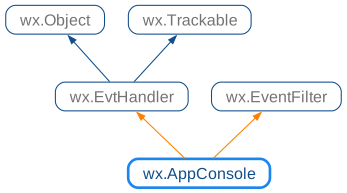
 Known Subclasses
 Methods Summary
Call |
|
Deletes the pending events of all EvtHandlers of this application. |
|
Call this to explicitly exit the main message (event) loop. |
|
Overridden wx.EventFilter method. |
|
Returns the user-readable application name. |
|
Returns the application name. |
|
Gets the class name of the application. |
|
Returns the one and only global application object. |
|
Returns the main event loop instance, i.e. the event loop which is started by |
|
Returns a pointer to the wx.AppTraits object for the application. |
|
Returns the user-readable vendor name. |
|
Returns the application’s vendor name. |
|
Returns |
|
Returns |
|
Check if the object had been scheduled for destruction with |
|
Called by wxWidgets on creation of the application. |
|
Called by |
|
Called by |
|
Override this member function for any processing which needs to be done as the application is about to exit. |
|
This must be provided by the application, and will usually create the application’s main window, optionally calling SetTopWindow(). |
|
Virtual function executing the application’s main event loop. |
|
Process all pending events; it is necessary to call this function to process events posted with |
|
Resume processing of the pending events previously stopped because of a call to |
|
Delayed objects destruction. |
|
Set the application name to be used in the user-visible places such as window titles. |
|
Sets the name of the application. |
|
Sets the C locale to the default locale for the current environment. |
|
Sets the class name of the application. |
|
Sets the error code to use in case of exit on error. |
|
Allows to set a custom process exit code if a fatal error happens. |
|
Allows external code to modify global wx.TheApp , but you should really know what you’re doing if you call it. |
|
Set the vendor name to be used in the user-visible places. |
|
Sets the name of application’s vendor. |
|
Temporary suspends processing of the pending events. |
|
Returns |
|
Yields control to pending messages in the event loop. |
 Properties Summary
See |
|
See |
|
See |
|
See |
|
See |
 Class API
- class wx.AppConsole(EvtHandler, EventFilter)
This class us used instead of App for console applications.
Methods
- static CallOnUnhandledException()
Call
OnUnhandledExceptionon the current TheApp object if it exists.This function is used by wxWidgets itself and is usually not meant to be called by the application code. If you do call it, it must be done from a
catchclause of atryblock, i.e. there must be a currently handled exception.The function checks if wx.TheApp is not nullptr and if it is, calls
OnUnhandledExceptionon it.Additionally, if this call results in an exception, it is caught and
wx.AppConsole.OnUnhandledExceptionis called.- Return type:
None
Added in version 4.3/wxWidgets-3.3.0.
- DeletePendingEvents(self)
Deletes the pending events of all EvtHandlers of this application.
See
wx.EvtHandler.DeletePendingEventsfor warnings about deleting the pending events.- Return type:
None
- ExitMainLoop(self)
Call this to explicitly exit the main message (event) loop.
You should normally exit the main loop (and the application) by deleting the top window.
This function simply calls EvtLoopBase.Exit() on the active loop.
- Return type:
None
- FilterEvent(self, event)
Overridden wx.EventFilter method.
This function is called before processing any event and allows the application to preempt the processing of some events, see wx.EventFilter documentation for more information.
wx.App implementation of this method always return -1 indicating that the event should be processed normally.
- Parameters:
event (wx.Event)
- Return type:
int
- GetAppDisplayName(self)
Returns the user-readable application name.
The difference between this string and the one returned by
GetAppNameis that this one is meant to be shown to the user and so should be used for the window titles, page headers and so on while the other one should be only used internally, e.g. for the file names or configuration file keys.If the application name for display had been previously set by
SetAppDisplayName, it will be returned by this function. Otherwise, ifSetAppNamehad been called its value will be returned; also as is. Finally if none was called, this function returns the program name capitalized usingString.Capitalize.- Return type:
str
Added in version 2.9.0.
- GetAppName(self)
Returns the application name.
If
SetAppNamehad been called, returns the string passed to it. Otherwise returns the program name, i.e. the value ofargv[0]passed to themain()function.- Return type:
str
See also
- GetClassName(self)
Gets the class name of the application.
The class name may be used in a platform specific manner to refer to the application.
- Return type:
str
See also
- static GetInstance()
Returns the one and only global application object.
Usually wx.TheApp is used instead.
- Return type:
See also
SetInstance,wx.App.GetGUIInstance
- GetMainLoop(self)
Returns the main event loop instance, i.e. the event loop which is started by
OnRunand which dispatches all events sent from the native toolkit to the application (except when new event loops are temporarily set-up).The returned value maybe nullptr. Put initialization code which needs a non-null main event loop into
OnEventLoopEnter.- Return type:
- GetTraits(self)
Returns a pointer to the wx.AppTraits object for the application.
If you want to customize the wx.AppTraits object, you must override the
CreateTraitsfunction.- Return type:
- GetVendorDisplayName(self)
Returns the user-readable vendor name.
The difference between this string and the one returned by
GetVendorNameis that this one is meant to be shown to the user and so should be used for the window titles, page headers and so on while the other one should be only used internally, e.g. for the file names or configuration file keys.By default, returns the same string as
GetVendorName.- Return type:
str
Added in version 2.9.0.
- GetVendorName(self)
Returns the application’s vendor name.
- Return type:
str
- HasPendingEvents(self)
Returns
Trueif there are pending events on the internal pending event list.Whenever
wx.EvtHandler.QueueEventorwx.EvtHandler.AddPendingEventare called (not only for wx.App itself, but for any event handler of the application!), the internal wx.App’s list of handlers with pending events is updated and this function will returnTrue.- Return type:
bool
- static IsMainLoopRunning()
Returns
Trueif the main event loop is currently running, i.e. if the application is insideOnRun.This can be useful to test whether events can be dispatched. For example, if this function returns
False, non-blocking sockets cannot be used because the events from them would never be processed.- Return type:
bool
- IsScheduledForDestruction(self, object)
Check if the object had been scheduled for destruction with
ScheduleForDestruction.This function may be useful as an optimization to avoid doing something with an object which will be soon destroyed in any case.
- Parameters:
object (wx.Object)
- Return type:
bool
- MainLoop(self)
Called by wxWidgets on creation of the application.
Override this if you wish to provide your own (environment-dependent) main loop.
- Return type:
int
- Returns:
0 under X, and the wParam of the
WM_QUITmessage under Windows.
- OnEventLoopEnter(self, loop)
Called by
wx.EventLoopBase.SetActive: you can override this function and put here the code which needs an active event loop.Note that this function is called whenever an event loop is activated; you may want to use
wx.EventLoopBase.IsMainto perform initialization specific for the app’s main event loop.- Parameters:
loop (wx.EventLoopBase)
- Return type:
None
See also
- OnEventLoopExit(self, loop)
Called by
wx.EventLoopBase.OnExitfor each event loop which is exited.- Parameters:
loop (wx.EventLoopBase)
- Return type:
None
See also
- OnExit(self)
Override this member function for any processing which needs to be done as the application is about to exit.
OnExit is called after destroying all application windows and controls, but before wxWidgets cleanup. Note that it is not called at all if
OnInitfailed.The return value of this function is currently ignored, return the same value as returned by the base class method if you override it.
NOTE: The base class method performs some cleanup - call it at the end of your method if you override it.- Return type:
int
- OnInit(self)
This must be provided by the application, and will usually create the application’s main window, optionally calling SetTopWindow().
You may use
OnExitto clean up anything initialized here, provided that the function returnsTrue.Notice that if you want to use the command line processing provided by wxWidgets (see
OnInitCmdLineandOnCmdLineParsedfunctions) you have to call the base class version in the derived classOnInit, e.g.:Return
Trueto continue processing,Falseto exit the application immediately. In the latter case, you may want to callSetErrorExitCodeto set the process exit code to use when the application terminates.- Return type:
bool
- OnRun(self)
Virtual function executing the application’s main event loop.
For the GUI applications, it is typically not necessary to override this function, as the default implementation, which enters the main event loop and dispatches all events until
ExitMainLoopis called (either explicitly or because the last top level window was closed), rarely needs to be customized.For the console applications not using event loops, this function can be used as the equivalent of the traditional
main()function by putting most of the program logic here.The return value of this function becomes the exit code of the program, so it should return 0 in case of successful termination.
Note that this function is not called at all if
OnInithad returnedFalse.- Return type:
int
- ProcessPendingEvents(self)
Process all pending events; it is necessary to call this function to process events posted with
wx.EvtHandler.QueueEventorwx.EvtHandler.AddPendingEvent.This happens during each event loop iteration (see wx.EventLoopBase) in GUI mode but it may be also called directly.
Note that this function does not only process the pending events for the wx.App object itself (which derives from wx.EvtHandler) but also the pending events for any event handler of this application.
This function will immediately return and do nothing if
SuspendProcessingOfPendingEventswas called.- Return type:
None
- ResumeProcessingOfPendingEvents(self)
Resume processing of the pending events previously stopped because of a call to
SuspendProcessingOfPendingEvents.- Return type:
None
- ScheduleForDestruction(self, object)
Delayed objects destruction.
In applications using events it may be unsafe for an event handler to delete the object which generated the event because more events may be still pending for the same object. In this case the handler may call
ScheduleForDestructioninstead. Schedule the object for destruction in the near future.Notice that if the application is not using an event loop, i.e. if
UsesEventLoopreturnsFalse, this method will simply delete the object immediately.Examples of using this function inside wxWidgets itself include deleting the top level windows when they are closed and sockets when they are disconnected.
- Parameters:
object (wx.Object)
- Return type:
None
- SetAppDisplayName(self, name)
Set the application name to be used in the user-visible places such as window titles.
See
GetAppDisplayNamefor more about the differences between the display name and name.Notice that if this function is called, the name is used as is, without any capitalization as done by default by
GetAppDisplayName.- Parameters:
name (string)
- Return type:
None
- SetAppName(self, name)
Sets the name of the application.
This name should be used for file names, configuration file entries and other internal strings. For the user-visible strings, such as the window titles, the application display name set by
SetAppDisplayNameis used instead.By default the application name is set to the name of its executable file.
- Parameters:
name (string)
- Return type:
None
See also
- SetCLocale(self)
Sets the C locale to the default locale for the current environment.
It is advised to call this to ensure that the underlying toolkit uses the locale in which the numbers and monetary amounts are shown in the format expected by user and so on.
Calling this function is roughly equivalent to calling
setlocale(LC_ALL, "")
but performs additional toolkit-specific tasks under some platforms and so should be used instead of
setlocale()itself. Alternatively, you can use wx.Locale to change the locale with more control.Notice that this does not change the global C++ locale, you need to do it explicitly if you want, e.g.
but be warned that locale support in C++ standard library can be poor or worse under some platforms.
- Return type:
None
Added in version 2.9.5.
- SetClassName(self, name)
Sets the class name of the application.
The class name is used in a platform specific manner. Currently it is used as “Application User Model
ID” under Windows (see Microsoft documentation), “appID” when using wxGTK 3.24.22 or later with Wayland (see Wayland documentation) and is unused under the other platforms.When it is used, the class name purpose is to allow the system to handle all windows with the same
IDas belonging to the same application, e.g. to group them together in the taskbar (so the value set here is used by TaskBarJumpList constructor). By default the application executable name is used as itsID, so it is not necessary to set the class name, but it may be useful to do it to specify a more unique string (typically by using a reverse domain name notation with the domain unique to the application vendor) or by specifying the sameIDin different applications that should be handled as a single one at UI level.Please note that
SetClassNamemust be called as early as possible and definitely before creating any top-level windows to have an effect. Typically it should be called in the constructor of the class derived from wx.App, e.g.- Parameters:
name (string)
- Return type:
None
Note
Under Windows setting the application user model
IDchanges some functionality available by default, notably Shift middle clicking the application icon in the taskbar doesn’t open a new instance of the application any more and most recently used files list maintained by the shell doesn’t work any longer. Application that need to keep this working need to useSHGetPropertyStoreForWindow()andSHAddToRecentDocs()functions to provide the necessary support for it.See also
- SetErrorExitCode(self, code)
Sets the error code to use in case of exit on error.
This function is mostly useful to customize the error code returned by the application when it exits due to
OnInitreturningFalseand can be called fromOnInititself or other virtual functions called from it, for exampleOnCmdLineError.By default, the exit code is
255which indicates a generic error, so it is may be useful to call this function to set a more precise exit code, e.g.2which is a de facto standard exit code if command line parsing fails.Please also note that in the previous versions of wxWidgets this exit code was
-1, which corresponds to either255or127depending on the platform and compiler used, so you may want to call this function with-1argument if you need to preserve compatibility with the old behaviour.SetErrorExitCodecan be overridden by the application to perform additional actions, but the overridden version should call the base class version to update the value returned by GetErrorExitCode() and actually used when exiting the application.- Parameters:
code (int)
- Return type:
None
Added in version 4.3/wxWidgets-3.3.0.
See also
- static SetFatalErrorExitCode(code)
Allows to set a custom process exit code if a fatal error happens.
If the program can’t continue due to a fatal error, such as receiving an unhandled exception or failing to initialize the graphical environment for the GUI applications, it terminates with the default fatal error exit code which is
255.This function can be used to change this default value to something else, e.g.
-1which used to be returned in the previous versions of wxWidgets (and corresponds to either255or127depending on the platform and compiler used) if compatibility is important.Notice that it has to be called as early as possible to take effect even during the early application initialization, e.g.
Note that this function doesn’t change the exit code returned if
OnInitreturnsFalse, so if you change the default value of this exit code you may want to callSetErrorExitCodeto change the other one too.- Parameters:
code (int)
- Return type:
None
Added in version 4.3/wxWidgets-3.3.0.
- static SetInstance(app)
Allows external code to modify global wx.TheApp , but you should really know what you’re doing if you call it.
- Parameters:
app (wx.AppConsole) – Replacement for the global application object.
- Return type:
None
See also
- SetVendorDisplayName(self, name)
Set the vendor name to be used in the user-visible places.
See
GetVendorDisplayNamefor more about the differences between the display name and name.- Parameters:
name (string)
- Return type:
None
- SetVendorName(self, name)
Sets the name of application’s vendor.
The name will be used in registry access. A default name is set by wxWidgets.
- Parameters:
name (string)
- Return type:
None
See also
- SuspendProcessingOfPendingEvents(self)
Temporary suspends processing of the pending events.
- Return type:
None
See also
- UsesEventLoop(self)
Returns
Trueif the application is using an event loop.This function always returns
Truefor the GUI applications which must use an event loop but by default only returnsTruefor the console programs if an event loop is already running as it can’t know whether one will be created in the future.Thus, it only makes sense to override it in console applications which do use an event loop, to return
Trueinstead of checking if there is a currently active event loop.- Return type:
bool
- Yield(self, onlyIfNeeded=False)
Yields control to pending messages in the event loop.
This method is a convenient wrapper for EvtLoopBase.Yield(). If the main loop is currently running, it calls this method on it. Otherwise it creates a temporary event loop and uses it instead, which can be useful to process pending messages during the program startup, before the main loop is created.
Use extreme caution when calling this function as, just as EvtLoopBase.Yield(), it can result in unexpected reentrances.
- Parameters:
onlyIfNeeded (bool)
- Return type:
bool
Properties
- AppDisplayName
See
GetAppDisplayNameandSetAppDisplayName
- AppName
See
GetAppNameandSetAppName
- ClassName
See
GetClassNameandSetClassName
- VendorDisplayName
- VendorName
See
GetVendorNameandSetVendorName
