
 wx.html2.WebView
This control may be used to render web (HTML / CSS / JavaScript) documents.
It is designed to allow the creation of multiple backends for each port. It differs from wx.html.HtmlWindow in that each backend is actually a full web engine, provided by a 3rd party (e.g., WebView2 on MSW or WebKit on macOS and GTK). This allows the correct viewing of complex pages with JavaScript and CSS.
Backend Descriptions
This class supports using multiple backends, corresponding to different implementations of the same functionality. WebViewChrome is available on all three major platforms and each platform also has its own default native backend. Backends are identified by their names, documented in the backend descriptions below.
WEBVIEW_BACKEND_IE (MSW)
The IE backend uses Microsoft’s WebBrowser control, which depends the locally installed version of Internet Explorer. By default this backend emulates Internet Explorer 7. This can be changed with a registry setting by WebViewIE.MSWSetEmulationLevel see this article for more information. This backend has full support for custom schemes and virtual file systems. The predefined WebViewBackendIE constant contains the name of this backend and can be used to explicitly select it when using wx.html2.WebView.New .
WEBVIEW_BACKEND_EDGE (MSW)
The Edge backend uses Microsoft’s Edge WebView2. It is available for Windows 7 (newer versions require Windows 10+) and newer. This backend does not support custom schemes. When using handlers, see wx.html2.WebViewHandler.SetVirtualHost for more details on how to access handler provided URLs. This backend is enabled by default only when using CMake. To build it follow these steps:
When not using CMake:
Download the WebView2 SDK NuGet package (Version 1.0.864.35 or newer)
Extract the package (it’s a zip archive) to
WX_SRCDIR/3rdparty/webview2(you should have3rdparty/webview2/build/native/include/WebView2.hfile after unpacking it)Enable
USE_WEBVIEW_EDGEinsetup.h
When using CMake, the backend is enabled by default. It can be disabled by setting
USE_WEBVIEW_EDGEtoOFF. If a WebView2SDKis found inWX_SRCDIR/3rdparty/webview2(see the bullet above), thatSDKis used. Otherwise, theSDKis downloaded and extracted by CMake during the configure phase (into directoryWX_BUILDDIR/libs/webview/packages)Build wxWidgets webview library
From the WebView2
SDKbuildsubdirectory copyWebView2Loader.dllcorresponding to the architecture used (x86 or x64) to the directory with your application executableAt runtime you can use
wx.html2.WebView.IsBackendAvailableto check if the backend can be used (it will be available ifWebView2Loader.dllcan be loaded and Edge (Chromium) is installed)Make sure to add a note about using the WebView2
SDKto your application documentation, as required by its licenceWith Visual Studio 2019 or newer
USE_WEBVIEW_EDGE_STATICcan be used to static link the loader and remove the dependency onWebView2Loader.dllat runtime.
If enabled and available at runtime, Edge will be selected as the default backend. If you require the IE backend use WebViewBackendIE when using wx.html2.WebView.New . If your application should use a fixed version of the WebView2 runtime you must use WebViewEdge.MSWSetBrowserExecutableDir to specify its usage before using the Edge backend. The predefined WebViewBackendEdge constant contains the name of this backend.
WEBVIEW_WEBKIT (GTK)
Under GTK the WebKit backend uses WebKitGTK+. The current minimum version required is 1.3.1 which ships by default with Ubuntu Natty and Debian Wheezy and has the package name libwebkitgtk-dev. Custom schemes and virtual files systems are supported under this backend, however embedded resources such as images and stylesheets are currently loaded using the data:// scheme. The predefined WebViewBackendWebKit constant contains the name of this backend.
WEBVIEW_WEBKIT2 (GTK3)
Under GTK3 the WebKit2 version of WebKitGTK+ is used. In Ubuntu the required package name is libwebkit2gtk-4.0-dev and under Fedora it is webkitgtk4-devel. All features are supported except for clearing and enabling / disabling the history. The predefined WebViewBackendWebKit constant contains the name of this backend.
WEBVIEW_WEBKIT (macOS)
The macOS WebKit backend uses Apple’s WKWebView class. This backend has full support for custom schemes and virtual file systems on macOS 10.13+. In order to use handlers, two-step creation has to be used and RegisterHandler has to be called before Create. Starting with macOS 10.11 and iOS 9 an application cannot create unsecure connections (this includes HTTP and unverified HTTPS). You have to include additional fields in your Info.plist to enable such connections. For further details see the documentation on NSAppTransportSecurity here The predefined WebViewBackendWebKit constant contains the name of this backend.
WEBVIEW_CHROMIUM (MSW, macOS, GTK)
The Chromium Embedded Framework backend has to be enabled when building wxWidgets, see WebViewChromium for additional usage and build instructions. The predefined WebViewBackendChromium constant contains the name of this backend.
Asynchronous Notifications
Many of the methods in wx.html2.WebView are asynchronous, i.e. they return immediately and perform their work in the background. This includes functions such as LoadURL and Reload. To receive notification of the progress and completion of these functions you need to handle the events that are provided. Specifically wxEVT_WEBVIEW_LOADED notifies when the page or a sub-frame has finished loading and wxEVT_WEBVIEW_ERROR notifies that an error has occurred.
Virtual File Systems and Custom Schemes
wx.html2.WebView supports the registering of custom scheme handlers, for example file or http . To do this create a new class which inherits from wx.html2.WebViewHandler, where wx.html2.WebViewHandler.GetFile returns a pointer to a wx.FSFile which represents the given url or wx.html2.WebViewHandler.StartRequest for more complex requests. You can then register your handler with RegisterHandler it will be called for all pages and resources. wx.html2.WebViewFSHandler is provided to access the virtual file system encapsulated by wx.FileSystem. The wx.MemoryFSHandler documentation gives an example of how this may be used. wx.html2.WebViewArchiveHandler is provided to allow the navigation of pages inside a zip archive. It supports paths of the form: scheme:///C:/example/docs.zip;protocol=zip/main.htm
 Events Emitted by this Class
Handlers bound for the following event types will receive one of the wx.html2.WebViewEvent parameters.
EVT_WEBVIEW_CREATED: Process a
wxEVT_WEBVIEW_CREATEDevent, generated when the object is fully initialized. For the backends using asynchronous initialization, such as WebViewChromium , most of this class member functions can be only used once this event is received. Available only in wxWidgets 3.3.0 or later.EVT_WEBVIEW_NAVIGATING: Process a
wxEVT_WEBVIEW_NAVIGATINGevent, generated before trying to get a resource. This event may be vetoed to prevent navigating to this resource. Note that if the displayed HTML document has several frames, one such event will be generated per frame.EVT_WEBVIEW_NAVIGATED: Process a
wxEVT_WEBVIEW_NAVIGATEDevent generated after it was confirmed that a resource would be requested. This event may not be vetoed. Note that if the displayed HTML document has several frames, one such event will be generated per frame.EVT_WEBVIEW_LOADED: Process a
wxEVT_WEBVIEW_LOADEDevent generated when the document is fully loaded and displayed. Note that if the displayed HTML document has several frames, one such event will be generated per frame.EVT_WEBVIEW_ERROR: Process a
wxEVT_WEBVIEW_ERRORevent generated when a navigation error occurs. The integer associated with this event will be a WebNavigationError item. The string associated with this event may contain a backend-specific more precise error message/code.EVT_WEBVIEW_NEWWINDOW: Process a
wxEVT_WEBVIEW_NEWWINDOWevent, generated when a new window is created. You must handle this event if you want anything to happen, for example to load the page in a new window or tab. For usage details see wx.html2.WebViewWindowFeatures.EVT_WEBVIEW_NEWWINDOW_FEATURES: Process a
wxEVT_WEBVIEW_NEWWINDOW_FEATURESevent, generated when window features are available for the new window. For usage details see wx.html2.WebViewWindowFeatures. Available only in wxWidgets 3.3.0 or later.EVT_WEBVIEW_WINDOW_CLOSE_REQUESTED: Process a
wxEVT_WEBVIEW_WINDOW_CLOSE_REQUESTEDevent, generated when a window is requested to be closed. Available only in wxWidgets 3.3.0 or later.EVT_WEBVIEW_TITLE_CHANGED: Process a
wxEVT_WEBVIEW_TITLE_CHANGEDevent, generated when the page title changes. Use GetString to get the title.EVT_WEBVIEW_FULLSCREEN_CHANGED: Process a
wxEVT_WEBVIEW_FULLSCREEN_CHANGEDevent, generated when the page wants to enter or leave fullscreen. Use GetInt to get the status. Not implemented for the IE backend. Available only in wxWidgets 3.1.5 or later.EVT_WEBVIEW_SCRIPT_MESSAGE_RECEIVED: Process a
wxEVT_WEBVIEW_SCRIPT_MESSAGE_RECEIVEDevent. Available only in wxWidgets 3.1.5 or later. For usage details seeAddScriptMessageHandler.EVT_WEBVIEW_SCRIPT_RESULT: Process a
wxEVT_WEBVIEW_SCRIPT_RESULTevent. Available only in wxWidgets 3.1.6 or later. For usage details seeRunScriptAsync.wxEVT_WEBVIEW_BROWSING_DATA_CLEARED: Process a
wxEVT_WEBVIEW_BROWSING_DATA_CLEAREDevent only available in wxWidgets 3.3.0 or later. For usage details seeClearBrowsingData.
Added in version 2.9.3.
Note
If you plan to display any modern web content you should consider using WEBVIEW_BACKEND_EDGE , as Internet Explorer is not supported anymore by Microsoft.
 Class Hierarchy
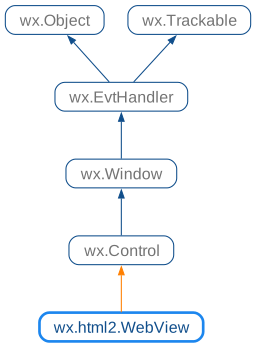
 Known Subclasses
WebViewChromium , WebViewEdge , WebViewIE
 Methods Summary
Add a script message handler with the given name. |
|
Injects the specified script into the webpage’s content. |
|
Returns |
|
Returns |
|
Returns |
|
Returns |
|
Returns |
|
Returns |
|
Returns |
|
Retrieve whether a zoom type is supported. |
|
Returns |
|
Clears the browsing data of the web view. |
|
Clear the history, this will also remove the visible page. |
|
Clears the current selection. |
|
Copies the current selection. |
|
Creation function for two-step creation. |
|
Cuts the current selection. |
|
Deletes the current selection. |
|
Enable or disable access to dev tools for the user. |
|
Enable or disable if browser accelerator keys are enabled. |
|
Enable or disable the right click context menu. |
|
Enable or disable the history. |
|
Finds a phrase on the current page and if found, the control will scroll the phrase into view and select it. |
|
Returns a list of items in the back history. |
|
Get the title of the current web page, or its URL/path if title is not available. |
|
Get the URL of the currently displayed document. |
|
Returns a list of items in the forward history. |
|
Return the pointer to the native backend used by this control. |
|
Get the HTML source code of the currently displayed document. |
|
Get the text of the current page. |
|
Returns the currently selected source, if any. |
|
Returns the currently selected text, if any. |
|
Returns the current user agent string for the web view. |
|
Get the zoom level of the page. |
|
Get the zoom factor of the page. |
|
Get how the zoom factor is currently interpreted. |
|
Navigate back in the history of visited pages. |
|
Navigate forward in the history of visited pages. |
|
Returns |
|
Returns |
|
Allows to check if a specific backend is currently available. |
|
Returns whether the web control is currently busy (e.g. loading a page). |
|
Returns |
|
Returns whether the web control is currently editable. |
|
Load a web page from a URL. |
|
Sets emulation level. |
|
Factory function to create a new wx.html2.WebView with two-step creation, |
|
Pastes the current data. |
|
Opens a print dialog so that the user may print the currently displayed page. |
|
Redos the last action. |
|
Allows the registering of new backend for wx.html2.WebView. |
|
Registers a custom scheme handler. |
|
Reload the currently displayed URL. |
|
Removes all user scripts from the web view. |
|
Remove a script message handler with the given name that was previously added via |
|
Runs the given JavaScript code. |
|
Runs the given JavaScript code asynchronously and returns the result via a |
|
Selects the entire page. |
|
Set the editable property of the web control. |
|
Set the displayed page source to the contents of the given string. |
|
Set the proxy to use for all requests. |
|
Specify a custom user agent string for the web view. |
|
Set the zoom level of the page. |
|
Set the zoom factor of the page. |
|
Set how to interpret the zoom factor. |
|
Show the dev tools window. |
|
Stop the current page loading process, if any. |
|
Undos the last action. |
 Properties Summary
See |
|
See |
|
See |
|
See |
|
See |
|
See |
|
See |
|
See |
|
See |
 Class API
- class wx.html2.WebView(Control)
This control may be used to render web (HTML / CSS / JavaScript) documents.
Methods
- AddScriptMessageHandler(self, name)
Add a script message handler with the given name.
To use the script message handler from javascript use
window.<name>.postMessage(<messageBody>)where<name>corresponds the value of the name parameter. The<messageBody>will be available to the application via awxEVT_WEBVIEW_SCRIPT_MESSAGE_RECEIVEDevent.Sample C++ code receiving a script message:
# Install message handler with the name wx_msg
self.webView.AddScriptMessageHandler('wx_msg')
# Bind an event handler to receive those messages
self.webView.Bind(wx.EVT_WEBVIEW_SCRIPT_MESSAGE_RECEIVED, self.handleMessage)
Sample JavaScript sending a script message:
# Send sample message body
window.wx_msg.postMessage('This is a message body')
- Parameters:
name (string) – Name of the message handler that can be used from JavaScript
- Return type:
bool
- Returns:
Trueif the handler could be added,Falseif it could not be added.
Added in version 4.1/wxWidgets-3.1.5.
Note
The Edge backend only supports a single message handler and the Chromium and IE backends do not support script message handlers.
See also
- AddUserScript(self, javascript, injectionTime=WEBVIEW_INJECT_AT_DOCUMENT_START)
Injects the specified script into the webpage’s content.
- Parameters:
javascript (string) – The JavaScript code to add.
injectionTime (WebViewUserScriptInjectionTime) – Specifies when the script will be executed.
- Return type:
bool
- Returns:
Trueif the script was added successfully.
Added in version 4.1/wxWidgets-3.1.5.
Note
Please note that this is unsupported by the IE backend and the Edge backend does only support
wx.html2.WEBVIEW_INJECT_AT_DOCUMENT_START.See also
- AreBrowserAcceleratorKeysEnabled(self)
Returns
Trueif browser accelerator keys are enabled.- Return type:
bool
Added in version 4.3/wxWidgets-3.3.0.
- CanCopy(self)
Returns
Trueif the current selection can be copied.- Return type:
bool
- CanCut(self)
Returns
Trueif the current selection can be cut.- Return type:
bool
- CanGoBack(self)
Returns
Trueif it is possible to navigate backward in the history of visited pages.- Return type:
bool
- CanGoForward(self)
Returns
Trueif it is possible to navigate forward in the history of visited pages.- Return type:
bool
- CanPaste(self)
Returns
Trueif data can be pasted.- Return type:
bool
- CanRedo(self)
Returns
Trueif there is an action to redo.- Return type:
bool
- CanSetZoomType(self, type)
Retrieve whether a zoom type is supported.
- Parameters:
type (WebViewZoomType) – The zoom type to test.
- Return type:
bool
- Returns:
Trueif this type of zoom is supported by this backend (and thus can be set throughSetZoomType).
- CanUndo(self)
Returns
Trueif there is an action to undo.- Return type:
bool
- ClearBrowsingData(self, types=WEBVIEW_BROWSING_DATA_ALL, since={})
Clears the browsing data of the web view.
This function clears the browsing data of the web view, such as cookies, cache, history, etc. The exact data that is cleared depends on the backend used.
This operation is asynchronous and may take some time to complete. When finished
wxEVT_WEBVIEW_BROWSING_DATA_CLEAREDevent is generated.- Parameters:
types (int) – The types of browsing data to clear. By default, it clears all types of browsing data.
since (wx.DateTime) – The time since when the browsing data should be cleared. By default, it clears all browsing data.
- Return type:
bool
- Returns:
Falseif backend doesn’t support clearing browsing data or an error occurred. Otherwise,Trueis returned and the browsing data will be cleared asynchronously and the application will receive awxEVT_WEBVIEW_BROWSING_DATA_CLEAREDevent when it is done (or if doing it fails later).
Added in version 4.3/wxWidgets-3.3.0.
Note
This is only implemented in the Edge, WebKit2GTK+ and macOS backends.
See also
- ClearHistory(self)
Clear the history, this will also remove the visible page.
- Return type:
None
Note
This is not implemented on the WebKit2GTK+ backend and macOS.
- ClearSelection(self)
Clears the current selection.
- Return type:
None
- Copy(self)
Copies the current selection.
- Return type:
None
- Create(self, parent, id=ID_ANY, url=WebViewDefaultURLStr, pos=DefaultPosition, size=DefaultSize, style=0, name=WebViewNameStr)
Creation function for two-step creation.
Please note that the object creation may be asynchronous when using some backends (e.g., WebViewEdge or WebViewChromium ) and the object is not really created until
wxEVT_WEBVIEW_CREATEDevent is received, so any non-trivial calls to its member functions should be delayed until then.
- CreateAccessible(self)
- Return type:
Accessible
- Cut(self)
Cuts the current selection.
- Return type:
None
- DeleteSelection(self)
Deletes the current selection.
Note that for
WEBVIEW_BACKEND_WEBKITthe selection must be editable, either through SetEditable or the correct HTML attribute.- Return type:
None
- EnableAccessToDevTools(self, enable=True)
Enable or disable access to dev tools for the user.
Dev tools are disabled by default.
- Parameters:
enable (bool)
- Return type:
None
Added in version 4.1/wxWidgets-3.1.4.
Note
This is not implemented for the IE backend.
See also
- EnableBrowserAcceleratorKeys(self, enable=True)
Enable or disable if browser accelerator keys are enabled.
Browser accelerator keys are enabled by default.
The webview might implement various accelerator keys. This includes allowing accelerator key access to features such as printing and navigation. In many cases this might not be desired and the default keys can be disabled with this setting.
- Parameters:
enable (bool)
- Return type:
None
Added in version 4.3/wxWidgets-3.3.0.
Note
This is only implemented for the Edge backend.
- EnableContextMenu(self, enable=True)
Enable or disable the right click context menu.
By default the standard context menu is enabled, this method can be used to disable it or re-enable it later.
- Parameters:
enable (bool)
- Return type:
None
Added in version 2.9.5.
- EnableHistory(self, enable=True)
Enable or disable the history.
This will also clear the history.
- Parameters:
enable (bool)
- Return type:
None
Note
This is not implemented on the WebKit2GTK+ backend and macOS.
- Find(self, text, flags=WEBVIEW_FIND_DEFAULT)
Finds a phrase on the current page and if found, the control will scroll the phrase into view and select it.
- Parameters:
text (string) – The phrase to search for.
flags (WebViewFindFlags) – The flags for the search.
- Return type:
int
- Returns:
If search phrase was not found in combination with the flags then
NOT_FOUNDis returned. If called for the first time with search phrase then the total number of results will be returned. Then for every time its called with the same search phrase it will return the number of the current match.
Added in version 2.9.5.
Note
This function will restart the search if the flags
WEBVIEW_FIND_ENTIRE_WORDorWEBVIEW_FIND_MATCH_CASEare changed, since this will require a new search. To reset the search, for example resetting the highlights call the function with an empty search phrase.
- GetBackwardHistory(self)
Returns a list of items in the back history.
The first item in the vector is the first page that was loaded by the control.
- Return type:
Any
- static GetClassDefaultAttributes(variant=WINDOW_VARIANT_NORMAL)
- Parameters:
variant (WindowVariant)
- Return type:
VisualAttributes
- GetCurrentTitle(self)
Get the title of the current web page, or its URL/path if title is not available.
- Return type:
str
- GetCurrentURL(self)
Get the URL of the currently displayed document.
- Return type:
str
- GetForwardHistory(self)
Returns a list of items in the forward history.
The first item in the vector is the next item in the history with respect to the currently loaded page.
- Return type:
Any
- GetNativeBackend(self)
Return the pointer to the native backend used by this control.
This method can be used to retrieve the pointer to the native web engine used by this control. The return value needs to be down-casted to the appropriate type depending on the backend:
Backend
Platform
Type
WEBVIEW_BACKEND_IEMSW
WEBVIEW_BACKEND_EDGEMSW
WEBVIEW_WEBKIT2GTK3WEBVIEW_WEBKITmacOS
WEBVIEW_CHROMIUMMSW, macOS, GTK
For example, you could set the WebKit options using this method:
# In Python the value returned will be a sip wrapper around a void* type,
# and it can be converted to the address being pointed to with int().
webview_ptr = self.webview.GetNativeBackend()

# Assuming you are able to get a ctypes, cffi or similar access to the
# webview library, you can use that pointer value to give it access to the
# WebView backend to operate upon.
theWebViewLib.doSomething(int(webview_ptr))
- Return type:
Any
Added in version 2.9.5.
See also
GetBackendVersionInfo
- GetPageSource(self)
Get the HTML source code of the currently displayed document.
- Return type:
str
- Returns:
The HTML source code, or an empty string if no page is currently shown.
- GetPageText(self)
Get the text of the current page.
- Return type:
str
- GetSelectedSource(self)
Returns the currently selected source, if any.
- Return type:
str
- GetSelectedText(self)
Returns the currently selected text, if any.
- Return type:
str
- GetUserAgent(self)
Returns the current user agent string for the web view.
- Return type:
str
Added in version 4.1/wxWidgets-3.1.5.
- GetZoom(self)
Get the zoom level of the page.
See
GetZoomFactorto get more precise zoom scale value other than as provided byWebViewZoom.- Return type:
- Returns:
The current level of zoom.
- GetZoomFactor(self)
Get the zoom factor of the page.
- Return type:
float
- Returns:
The current factor of zoom.
Added in version 4.1/wxWidgets-3.1.4.
- GetZoomType(self)
Get how the zoom factor is currently interpreted.
- Return type:
- Returns:
How the zoom factor is currently interpreted by the backend.
- GoBack(self)
Navigate back in the history of visited pages.
Only valid if
CanGoBackreturnsTrue.- Return type:
None
- GoForward(self)
Navigate forward in the history of visited pages.
Only valid if
CanGoForwardreturnsTrue.- Return type:
None
- HasSelection(self)
Returns
Trueif there is a current selection.- Return type:
bool
- IsAccessToDevToolsEnabled(self)
Returns
Trueif dev tools are available to the user.- Return type:
bool
Added in version 4.1/wxWidgets-3.1.4.
- static IsBackendAvailable(backend)
Allows to check if a specific backend is currently available.
For example, to check for Edge backend availability:
if wx.html2.WebView.IsBackendAvailable(wx.html2.WebViewBackendEdge):
    # Do whatever you need to do when the Edge backend is available
- Parameters:
backend (string)
- Return type:
bool
Added in version 4.1/wxWidgets-3.1.4.
- IsBusy(self)
Returns whether the web control is currently busy (e.g. loading a page).
- Return type:
bool
- IsContextMenuEnabled(self)
Returns
Trueif a context menu will be shown on right click.- Return type:
bool
Added in version 2.9.5.
- IsEditable(self)
Returns whether the web control is currently editable.
- Return type:
bool
- LoadURL(self, url)
Load a web page from a URL.
- Parameters:
url (string) – The URL of the page to be loaded.
- Return type:
None
Note
Web engines generally report errors asynchronously, so if you wish to know whether loading the URL was successful, register to receive navigation error events.
- static MSWSetEmulationLevel(level=WEBVIEWIE_EMU_IE11)
Sets emulation level.
This function is useful to change the emulation level of the system browser control used for wx.html2.WebView implementation under MSW, rather than using the currently default, IE7-compatible, level.
Please notice that this function works by modifying the per-user part of MSW registry, which has several implications: first, it is sufficient to call it only once (per user) as the changes done by it are persistent and, second, if you do not want them to be persistent, you need to call it with
WEBVIEWIE_EMU_DEFAULTargument explicitly.In particular, this function should be called to allow
RunScriptto work for JavaScript code returning arbitrary objects, which is not supported at the default emulation level.If set to a level higher than installed version, the highest available level will be used instead.
WEBVIEWIE_EMU_IE11is recommended for best performance and experience.This function is MSW-specific and doesn’t exist under other platforms.
See https://msdn.microsoft.com/en-us/library/ee330730#browser_emulation for more information about browser control emulation levels.
- Parameters:
level (WebViewIE_EmulationLevel) – the target emulation level
- Return type:
bool
- Returns:
Trueon success,Falseon failure (a warning message is also logged in the latter case).
Added in version 4.1/wxWidgets-3.1.3.
- static MSWSetModernEmulationLevel(modernLevel=True)
Please explicitly specify emulation level with
MSWSetEmulationLevel.- Parameters:
modernLevel (bool) –
Trueto set level toIE8, synonym forWEBVIEWIE_EMU_IE8.Falseto reset the emulation level to its default, synonym forWEBVIEWIE_EMU_DEFAULT.- Return type:
bool
- Returns:
Trueon success,Falseon failure (a warning message is also logged in the latter case).
Added in version 4.1/wxWidgets-3.1.1.
Deprecated
This function is kept mostly for backwards compatibility.
- static New(*args, **kw)
 Overloaded Implementations:
New (backend=WebViewBackendDefault)
Factory function to create a new wx.html2.WebView with two-step creation,
wx.html2.WebView.Createshould be called on the returned object.- Parameters:
backend (string) – The backend to use.
- Return type:
- Returns:
The created wx.html2.WebView.
Added in version 2.9.5.
New (config)
Factory function to create a new wx.html2.WebView with two-step creation,
wx.html2.WebView.Createshould be called on the returned object.- Parameters:
config (wx.html2.WebViewConfiguration) – a configuration object create with
NewConfiguration.- Return type:
- Returns:
The created wx.html2.WebView
Added in version 4.3/wxWidgets-3.3.0.
New (parent, id=ID_ANY, url=WebViewDefaultURLStr, pos=DefaultPosition, size=DefaultSize, backend=WebViewBackendDefault, style=0, name=WebViewNameStr)
Factory function to create a new wx.html2.WebView using a wx.html2.WebViewFactory.
Note that the returned object may not be immediately usable yet, see
Createand wxEVT_WEBVIEW_CREATED.- Parameters:
parent (wx.Window) – Parent window for the control
id (wx.WindowID) –
IDof this controlurl (string) – Initial URL to load
pos (wx.Point) – Position of the control
size (wx.Size) – Size of the control
backend (string) – The backend web engine to use.
WebViewBackendDefaultand other backend names constants in formatWebViewBackend<Name>(e.g.,WebViewBackendWebKit) are predefined where appropriate. See Backend descriptions.style (long) – Window style. For generic window styles, please see wx.Window.
name (string) – Window name.
- Return type:
- Returns:
The created wx.html2.WebView, or nullptr if the requested backend is not available
Added in version 2.9.5.
- Paste(self)
Pastes the current data.
- Return type:
None
- Print(self)
Opens a print dialog so that the user may print the currently displayed page.
- Return type:
None
- Redo(self)
Redos the last action.
- Return type:
None
- static RegisterFactory(backend, factory)
Allows the registering of new backend for wx.html2.WebView.
backend can be used as an argument to
New.- Parameters:
backend (string) – The name for the new backend to be registered under
factory (wx.html2.WebViewFactory) – A shared pointer to the factory which creates the appropriate backend.
- Return type:
None
Added in version 2.9.5.
- RegisterHandler(self, handler)
Registers a custom scheme handler.
- Parameters:
handler (wx.html2.WebViewHandler) – A shared pointer to a WebHandler.
- Return type:
None
Note
On macOS in order to use handlers two-step creation has to be used and
RegisterHandlerhas to be called beforeCreate. With the other backends it has to be called afterCreate.Note
The Edge backend does not support custom schemes, but the handler is available as a virtual host under https://scheme.wxsite. To customize this virtual host call
wx.html2.WebViewHandler.SetVirtualHostbefore registering the handler.
- Reload(self, flags=WEBVIEW_RELOAD_DEFAULT)
Reload the currently displayed URL.
- Parameters:
flags (WebViewReloadFlags) – A bit array that may optionally contain reload options.
- Return type:
None
Note
The flags are ignored by the Edge backend.
- RemoveAllUserScripts(self)
Removes all user scripts from the web view.
- Return type:
None
Added in version 4.1/wxWidgets-3.1.5.
See also
- RemoveScriptMessageHandler(self, name)
Remove a script message handler with the given name that was previously added via
AddScriptMessageHandler.- Parameters:
name (string)
- Return type:
bool
- Returns:
Trueif the handler could be removed,Falseif it could not be removed.
Added in version 4.1/wxWidgets-3.1.5.
See also
- RunScript(self, javascript)
Runs the given JavaScript code.
JavaScript code is executed inside the browser control and has full access to
DOMand other browser-provided functionality. For example, this codewebview.RunScript("document.write('Hello from wx.Widgets!')")
will replace the current page contents with the provided string.
If output is non-null, it is filled with the result of executing this code on success, e.g. a JavaScript value such as a string, a number (integer or floating point), a boolean or
JSONrepresentation for non-primitive types such as arrays and objects. For example:success, result = webview.RunScript( "document.getElementById('some_id').innderHTML") if success: ... result contains the contents of the given element ... else: ... the element with self ID probably doesn't exist ...
This function has a few platform-specific limitations:
When using WebKit v1 in wxGTK2, retrieving the result of JavaScript execution is unsupported and this function will always return
Falseif output is non-null to indicate this. This functionality is fully supported when using WebKit v2 or later inGTK3.When using WebKit under macOS, code execution is limited to at most 10MiB of memory and 10 seconds of execution time.
When using Chromium backend, retrieving the result of JavaScript execution is unsupported and this function will always return
Falseif output is non-null to indicate this.When using IE backend under MSW, scripts can only be executed when the current page is fully loaded (i.e.
wxEVT_WEBVIEW_LOADEDevent was received). A script tag inside the page HTML is required in order to run JavaScript.
Also notice that with the IE backend converting JavaScript objects to
JSONis not supported in the default emulation mode, it implements its own object-to-JSON conversion as a fallback for this case, however it is not as full-featured, well-tested or performing as the implementation of this functionality in the browser control itself, so it is recommended to use MSWSetEmulationLevel() to change emulation level to a more modern one in whichJSONconversion is done by the control itself.- Parameters:
javascript (string) – JavaScript code to execute.
- Return type:
Tuple[bool, str]
- Returns:
Trueif there is a result,Falseif there is an error.
Note
Because of various potential issues it’s recommended to use
RunScriptAsyncinstead of this method. This is especiallyTrueif you plan to run code from a webview event and will also prevent unintended side effects on the UI outside of the webview.See also
- RunScriptAsync(self, javascript, clientData=nullptr)
Runs the given JavaScript code asynchronously and returns the result via a
wxEVT_WEBVIEW_SCRIPT_RESULT.The script result value can be retrieved via
wx.html2.WebViewEvent.GetString. If the execution failswx.html2.WebViewEvent.IsErrorwill returnTrue. In this case additional script execution error information maybe available viawx.html2.WebViewEvent.GetString.- Parameters:
javascript (string) – JavaScript code to execute.
clientData – Arbirary pointer to data that can be retrieved from the result event.
- Return type:
None
Added in version 4.1/wxWidgets-3.1.6.
Note
The IE backend does not support async script execution.
See also
- SelectAll(self)
Selects the entire page.
- Return type:
None
- SetEditable(self, enable=True)
Set the editable property of the web control.
Enabling allows the user to edit the page even if the
contenteditableattribute is not set. The exact capabilities vary with the backend being used.- Parameters:
enable (bool)
- Return type:
None
Note
This is not implemented for macOS and the Edge backend.
- SetPage(self, *args, **kw)
- Overloaded Implementations:
SetPage (self, html, baseUrl)
Set the displayed page source to the contents of the given string.
- Parameters:
html (string) – The string that contains the HTML data to display.
baseUrl (string) – URL assigned to the HTML data, to be used to resolve relative paths, for instance.
- Return type:
None
Note
When using
WEBVIEW_BACKEND_IEyou must wait for the current page to finish loading before callingSetPage. The baseURL parameter is not used in this backend and the Edge backend.SetPage (self, html, baseUrl)
Set the displayed page source to the contents of the given stream.
- Parameters:
html (wx.InputStream) – The stream to read HTML data from.
baseUrl (string) – URL assigned to the HTML data, to be used to resolve relative paths, for instance.
- Return type:
None
- SetProxy(self, proxy)
Set the proxy to use for all requests.
The proxy string must be a valid proxy specification, e.g. http://my.local.proxy.corp:8080
Currently this function is only implemented in WebKit2, Edge and Chromium backends and only WebKit2 backend allows to set the proxy after creating the webview, so it is recommended to call it before
Create:- Parameters:
proxy (string)
- Return type:
bool
- Returns:
Trueif proxy was set successfully orFalseif it failed, e.g. because this is not supported by the currently used backend.
- SetUserAgent(self, userAgent)
Specify a custom user agent string for the web view.
Returns
Truethe user agent could be set.If your first request should already use the custom user agent please use two step creation and call
SetUserAgentbeforeCreate.- Parameters:
userAgent (string)
- Return type:
bool
Added in version 4.1/wxWidgets-3.1.5.
Note
This is not implemented for IE.
- SetZoom(self, zoom)
Set the zoom level of the page.
See
SetZoomFactorfor more precise scaling other than the measured steps provided byWebViewZoom.- Parameters:
zoom (WebViewZoom) – How much to zoom (scale) the HTML document.
- Return type:
None
- SetZoomFactor(self, zoom)
Set the zoom factor of the page.
- Parameters:
zoom (float) – How much to zoom (scale) the HTML document in arbitrary number.
- Return type:
None
Added in version 4.1/wxWidgets-3.1.4.
Note
zoom scale in IE will be converted into
WebViewZoomlevels forWebViewZoomTypeofWEBVIEW_ZOOM_TYPE_TEXT.
- SetZoomType(self, zoomType)
Set how to interpret the zoom factor.
- Parameters:
zoomType (WebViewZoomType) – How the zoom factor should be interpreted by the backend.
- Return type:
None
Note
invoke
CanSetZoomTypefirst, some backends may not support all zoom types.
- ShowDevTools(self)
Show the dev tools window.
Immediately open the dev tools window. Does nothing if this window was already open.
Unlike
EnableAccessToDevTools, which allows the user to open the dev tools window from the context menu, this function opens the same window programmatically.Please note that while
ShowDevToolscan be used whether access to the dev tools from the context menu was enabled or not, in WebKit2GTK+ backend calling it also enables interactive access to the dev tools from the context menu as a side effect.- Return type:
bool
- Returns:
Trueif the dev tools window is shown (even if it had been already shown before this function was called),Falseif it could not be shown for some reason, most likely because the backend does not provide this functionality.
Added in version 4.3/wxWidgets-3.3.0.
Note
This function is not implemented in the IE and WebKit (GTK/macOS) backends (but is implemented for WebKit2 GTK backend).
- Stop(self)
Stop the current page loading process, if any.
May trigger an error event of type
WEBVIEW_NAV_ERR_USER_CANCELLED.TODO: makeWEBVIEW_NAV_ERR_USER_CANCELLEDerrors uniform across ports.- Return type:
None
- Undo(self)
Undos the last action.
- Return type:
None
Properties
- BackwardHistory
- CurrentTitle
See
GetCurrentTitle
- CurrentURL
See
GetCurrentURL
- ForwardHistory
- NativeBackend
See
GetNativeBackend
- PageSource
See
GetPageSource
- PageText
See
GetPageText
- SelectedSource
- SelectedText
See
GetSelectedText
- UserAgent
See
GetUserAgentandSetUserAgent
- ZoomFactor
See
GetZoomFactorandSetZoomFactor
- ZoomType
See
GetZoomTypeandSetZoomType
