
 wx.aui.AuiNotebook
wx.aui.AuiNotebook is part of the AUI class framework, which represents a notebook control, managing multiple windows with associated tabs.
See also AUI Overview.
wx.aui.AuiNotebook is a notebook control which implements many features common in applications with dockable panes. Specifically, wx.aui.AuiNotebook implements functionality which allows the user to rearrange tab order via drag-and-drop, split the tab window into many different splitter configurations, and toggle through different themes to customize the control’s look and feel.
The default theme since wxWidgets 3.3.0 is wx.aui.AuiFlatTabArt. If you would prefer to use the theme which used to be default in the previous versions, you can call wx.aui.AuiNotebook.SetArtProvider with AuiNativeTabArt as the argument. Notice that AuiNativeTabArt may be not compatible with AUI_NB_BOTTOM, AUI_NB_PIN_ON_ACTIVE_TAB and AUI_NB_UNPIN_ON_ALL_PINNED styles, so using it is not recommended if you use any of them.
Multiple Tab Controls
Initially, wx.aui.AuiNotebook creates the main tab control, which can be retrieved using GetMainTabCtrl, and uses it for all tabs. However when AUI_NB_TAB_SPLIT style is used (which is the case by default), the user will be able to drag pages out of it and create new tab controls, that can then themselves be dragged to be docked in a different place inside the notebook. Also, whether AUI_NB_TAB_SPLIT is specified or not, Split function can always be used to create new tab controls programmatically. When using multiple tab controls, exactly one of them is active at any time. This tab control can be retrieved by calling GetActiveTabCtrl and is always used for appending or inserting new pages. You can also use GetAllTabCtrls to get all existing tab controls.
Pages Indices and Positions
Each notebook page has its logical index, which is determined by the order in which the pages are added, i.e. the first page added has index 0, the second one has index 1, and so on, but also has its physical display position, which corresponds to the position at which it is displayed. Initially the indices and positions are the same for all pages, but they may become different if the user reorders the pages by dragging them around (which is possible when AUI_NB_TAB_MOVE style, included in the default notebook flags, is on). Also note that it’s possible to have multiple pages with the same physical position, in different tab controls (see the previous section), e.g. each first page in each tab control has physical position 0, but there is only one page with logical index 0. All functions taking a page index parameter, such as SetPageText, work with logical indices. Similarly, functions returning a page index, such as GetSelection, also always return logical indices. To get the physical position of a single page, use GetPagePosition and to get all pages in some tab control in their physical, display order GetPagesInDisplayOrder can be used.
Pages Layout
 Window Styles
When the user can change the notebook layout interactively, i.e. when AUI_NB_TAB_MOVE and/or AUI_NB_TAB_SPLIT styles are used, it can be useful to remember the current layout on program exit and restore it when it is restarted. This can be done by saving, and reloading, the layout of the entire wx.aui.AuiManager containing this notebook using wx.aui.AuiManager.SaveLayout and wx.aui.AuiManager.LoadLayout , but it can also be done just for the given notebook, without affecting the other panes, using SaveLayout and LoadLayout functions of this class. Using them is similar to using wx.aui.AuiManager functions, except they only require implementing wx.aui.AuiBookSerializer or wx.aui.AuiBookDeserializer interface, which is a subset of the full wx.aui.AuiSerializer or wx.aui.AuiDeserializer. The Advanced User Interface Sample shows how to use them. This class supports the following styles:
wx.aui.AUI_NB_DEFAULT_STYLE: Defined aswx.aui.AUI_NB_TOP|wx.aui.AUI_NB_TAB_SPLIT|wx.aui.AUI_NB_TAB_MOVE|wx.aui.AUI_NB_SCROLL_BUTTONS|wx.aui.AUI_NB_CLOSE_ON_ACTIVE_TAB|wx.aui.AUI_NB_MIDDLE_CLICK_CLOSE.wx.aui.AUI_NB_TAB_SPLIT: Allows the tab control to be split by dragging a tab.wx.aui.AUI_NB_TAB_MOVE: Allows a tab to be moved horizontally by dragging.wx.aui.AUI_NB_TAB_EXTERNAL_MOVE: Allows a tab to be moved to another tab control.wx.aui.AUI_NB_TAB_FIXED_WIDTH: With this style, all tabs have the same width.wx.aui.AUI_NB_SCROLL_BUTTONS: With this style, left and right scroll buttons are displayed. Note that this style is ignored ifwx.aui.AUI_NB_MULTILINEis used.wx.aui.AUI_NB_WINDOWLIST_BUTTON: With this style, a drop-down list of windows is available.wx.aui.AUI_NB_CLOSE_BUTTON: With this style, a close button is available on the tab bar.wx.aui.AUI_NB_CLOSE_ON_ACTIVE_TAB: With this style, the close button is visible on the active tab.wx.aui.AUI_NB_CLOSE_ON_ALL_TABS: With this style, the close button is visible on all tabs.wx.aui.AUI_NB_MIDDLE_CLICK_CLOSE: With this style, middle click on a tab closes the tab.wx.aui.AUI_NB_TOP: With this style, tabs are drawn along the top of the notebook.wx.aui.AUI_NB_BOTTOM: With this style, tabs are drawn along the bottom of the notebook.wx.aui.AUI_NB_MULTILINE: If this style is specified and all the tabs don’t fit in the visible area, multiple rows of tabs are used instead of adding a button allowing to scroll them. This style is only available in wxWidgets 3.3.0 or later.wx.aui.AUI_NB_PIN_ON_ACTIVE_TAB: If this style is specified, the active tab shows either a “pin” icon allowing to pin it (i.e. change its kind towx.aui.AuiTabKind.Pinned) if it’s not currently pinned or an “unpin” icon to change the kind back to normal. This style is not included in the default notebook style and has to be explicitly specified for the user to be able to pin the tabs interactively. It is available in wxWidgets 3.3.0 or later.wx.aui.AUI_NB_UNPIN_ON_ALL_PINNED: If this style is specified, “unpin” button is shown on all currently pinned tabs, allowing the user to unpin them, i.e. make them normal again. This style can be combined withAUI_NB_PIN_ON_ACTIVE_TABor used on its own. It is available in wxWidgets 3.3.0 or later.
 Events Emitted by this Class
Handlers bound for the following event types will receive one of the wx.aui.AuiNotebookEvent parameters.
EVT_AUINOTEBOOK_PAGE_CLOSE: A page is about to be closed. Processes a
wxEVT_AUINOTEBOOK_PAGE_CLOSEevent.EVT_AUINOTEBOOK_PAGE_CLOSED(winid, fn): A page has been closed. Processes a
wxEVT_AUINOTEBOOK_PAGE_CLOSEDevent.EVT_AUINOTEBOOK_PAGE_CHANGED: The page selection was changed. Processes a
wxEVT_AUINOTEBOOK_PAGE_CHANGEDevent.EVT_AUINOTEBOOK_PAGE_CHANGING: The page selection is about to be changed. Processes a
wxEVT_AUINOTEBOOK_PAGE_CHANGINGevent. This event can be vetoed.EVT_AUINOTEBOOK_BUTTON: The window list button has been pressed. Processes a
wxEVT_AUINOTEBOOK_BUTTONevent.EVT_AUINOTEBOOK_BEGIN_DRAG: Dragging is about to begin. Processes a
wxEVT_AUINOTEBOOK_BEGIN_DRAGevent.EVT_AUINOTEBOOK_END_DRAG: Dragging has ended. Processes a
wxEVT_AUINOTEBOOK_END_DRAGevent.EVT_AUINOTEBOOK_DRAG_MOTION: Emitted during a drag and drop operation. Processes a
wxEVT_AUINOTEBOOK_DRAG_MOTIONevent.EVT_AUINOTEBOOK_ALLOW_DND: Whether to allow a tab to be dropped. Processes a
wxEVT_AUINOTEBOOK_ALLOW_DNDevent. This event must be specially allowed.EVT_AUINOTEBOOK_DRAG_DONE(winid, fn): Notify that the tab has been dragged. Processes a
wxEVT_AUINOTEBOOK_DRAG_DONEevent.EVT_AUINOTEBOOK_TAB_MIDDLE_DOWN(winid, fn): The middle mouse button is pressed on a tab. Processes a
wxEVT_AUINOTEBOOK_TAB_MIDDLE_DOWNevent.EVT_AUINOTEBOOK_TAB_MIDDLE_UP(winid, fn): The middle mouse button is released on a tab. Processes a
wxEVT_AUINOTEBOOK_TAB_MIDDLE_UPevent.EVT_AUINOTEBOOK_TAB_RIGHT_DOWN(winid, fn): The right mouse button is pressed on a tab. Processes a
wxEVT_AUINOTEBOOK_TAB_RIGHT_DOWNevent.EVT_AUINOTEBOOK_TAB_RIGHT_UP(winid, fn): The right mouse button is released on a tab. Processes a
wxEVT_AUINOTEBOOK_TAB_RIGHT_UPevent.EVT_AUINOTEBOOK_BG_DCLICK(winid, fn): Double clicked on the tabs background area. Processes a
wxEVT_AUINOTEBOOK_BG_DCLICKevent.
Please see the note in wx.aui.AuiNotebookEvent documentation about handling these events.
 Class Hierarchy
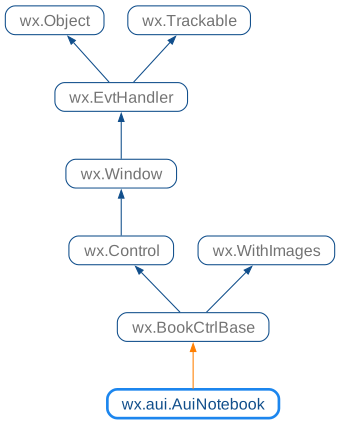
 Known Subclasses
 Methods Summary
Default constructor. |
|
Adds a page. |
|
Sets the selection to the next or previous page in the same tab control. |
|
Changes the selection for the given page, returning the previous selection. |
|
Creates the notebook window. |
|
Deletes all pages. |
|
Deletes a page at the given index. |
|
Finds tab control associated with a given window and its tab index. |
|
Returns active tab control for this notebook. |
|
Returns the associated art provider. |
|
Returns the currently selected page or nullptr. |
|
Returns the desired height of the notebook for the given page height. |
|
Returns the main tab control for this notebook. |
|
Returns the page specified by the given index. |
|
Returns the tab bitmap for the page. |
|
Returns the number of pages in the notebook. |
|
Returns the image index for the given page. |
|
Returns the page index for the specified window. |
|
Returns the tab kind for the page. |
|
Returns the position of the page in the notebook. |
|
Returns the tab label for the page. |
|
Returns the tooltip for the tab label of the page. |
|
Returns the currently selected page. |
|
Returns tab control based on point coordinates inside the tab frame. |
|
Returns the height of the tab control. |
|
|
|
Load the previously saved layout of the notebook. |
|
Removes a page, without deleting the window pointer. |
|
Save the layout of the notebook using the provided serializer. |
|
Sets the art provider to be used by the notebook. |
|
Sets the font for drawing the tab labels, using a bold version of the font for selected tab labels. |
|
Sets the flags for the wx.aui.AuiManager used by wx.aui.AuiNotebook. |
|
Sets the font for measuring tab labels. |
|
Sets the font for drawing unselected tab labels. |
|
Sets the bitmap for the page. |
|
Sets the image index for the given page. |
|
Set the tab kind. |
|
Sets the tab label for the page. |
|
Sets the tooltip displayed when hovering over the tab label of the page. |
|
Sets the font for drawing selected tab labels. |
|
Sets the page selection. |
|
Sets the tab height. |
|
Ensure that all tabs have the same height, even if some of them don’t have bitmaps. |
|
Shows the window menu for the active tab control associated with this notebook, and returns |
|
Split performs a split operation programmatically. |
|
Remove all split tab controls, leaving only the single one. |
 Properties Summary
See |
|
See |
|
See |
|
See |
|
See |
|
See |
|
See |
 Class API
- class wx.aui.AuiNotebook(BookCtrlBase)
Possible constructors:
AuiNotebook() -> None

AuiNotebook(parent, id=ID_ANY, pos=DefaultPosition, size=DefaultSize,
            style=AUI_NB_DEFAULT_STYLE) -> None
AuiNotebook is part of the
AUIclass framework, which represents a notebook control, managing multiple windows with associated tabs.
Methods
- __init__(self, *args, **kw)
 Overloaded Implementations:
__init__ (self)
Default constructor.
- Return type:
None
__init__ (self, parent, id=ID_ANY, pos=DefaultPosition, size=DefaultSize, style=AUI_NB_DEFAULT_STYLE)
Constructor.
Creates a AuiNotebok control.
- Parameters:
- Return type:
None
- AddPage(self, *args, **kw)
- Overloaded Implementations:
AddPage (self, page, caption, select=False, bitmap=BitmapBundle())
Adds a page.
If the
selectparameter isTrue, calling this will generate a page change event.- Parameters:
page (wx.Window)
caption (string)
select (bool)
bitmap (wx.BitmapBundle)
- Return type:
bool
AddPage (self, page, text, select, imageId)
Adds a new page.
The page must have the book control itself as the parent and must not have been added to this control previously.
The call to this function may generate the page changing events.
- Parameters:
page (wx.Window) – Specifies the new page.
text (string) – Specifies the text for the new page.
select (bool) – Specifies whether the page should be selected.
imageId (int) – Specifies the optional image index for the new page.
- Return type:
bool
- Returns:
Trueif successful,Falseotherwise.
Added in version 2.9.3.
Note
Do not delete the page, it will be deleted by the book control.
See also
- AdvanceSelection(self, forward=True)
Sets the selection to the next or previous page in the same tab control.
This function sets selection to the next (if forward is
True) or previous (otherwise) page after or before the currently selected one in but without leaving the current tab control.- Parameters:
forward (bool)
- Return type:
None
- ChangeSelection(self, n)
Changes the selection for the given page, returning the previous selection.
This function behaves as
SetSelectionbut does not generate the page changing events.See User Generated Events vs Programmatically Generated Events for more information.
- Parameters:
n (int)
- Return type:
int
Added in version 2.9.3.
- Create(self, parent, id=ID_ANY, pos=DefaultPosition, size=DefaultSize, style=0)
Creates the notebook window.
- CreateAccessible(self)
- Return type:
Accessible
- DeleteAllPages(self)
Deletes all pages.
- Return type:
bool
Added in version 2.9.3.
- DeletePage(self, page)
Deletes a page at the given index.
Calling this method will generate a page change event.
- Parameters:
page (int)
- Return type:
bool
- FindTab(self, page, ctrl, idx)
Finds tab control associated with a given window and its tab index.
- Parameters:
page (wx.Window)
ctrl (AuiTabCtrl)
idx (int)
- Return type:
bool
- Returns:
Truewhen the tab control is found,Falseotherwise.
Added in version 4.1/wxWidgets-3.1.4.
- GetActiveTabCtrl(self)
Returns active tab control for this notebook.
Active tab control is the one containing the currently selected page. If there is no selected page, the main tab control is returned, see
GetMainTabCtrl.- Return type:
- Returns:
Non-nullptr pointer to either the active or main tab control.
Added in version 4.1/wxWidgets-3.1.4.
- GetArtProvider(self)
Returns the associated art provider.
- Return type:
- static GetClassDefaultAttributes(variant=WINDOW_VARIANT_NORMAL)
- Parameters:
variant (WindowVariant)
- Return type:
VisualAttributes
- GetCurrentPage(self)
Returns the currently selected page or nullptr.
- Return type:
Window
Added in version 2.9.3.
- GetHeightForPageHeight(self, pageHeight)
Returns the desired height of the notebook for the given page height.
Use this to fit the notebook to a given page size.
- Parameters:
pageHeight (int)
- Return type:
int
- GetMainTabCtrl(self)
Returns the main tab control for this notebook.
The main tab control is the one created by the notebook itself initially to contain the pages added to it.
- Return type:
- Returns:
Non-nullptr pointer to the main tab control.
Added in version 4.3/wxWidgets-3.3.0.
- GetPage(self, page_idx)
Returns the page specified by the given index.
- Parameters:
page_idx (int)
- Return type:
Window
- GetPageBitmap(self, page)
Returns the tab bitmap for the page.
- Parameters:
page (int)
- Return type:
Bitmap
- GetPageCount(self)
Returns the number of pages in the notebook.
- Return type:
int
- GetPageImage(self, nPage)
Returns the image index for the given page.
- Parameters:
nPage (int)
- Return type:
int
- GetPageIndex(self, page_wnd)
Returns the page index for the specified window.
If the window is not found in the notebook,
wx.NOT_FOUNDis returned.This is AUI-specific equivalent to BookCtrl.FindPage() and it is recommended to use that generic method instead of this one.
- Parameters:
page_wnd (wx.Window)
- Return type:
int
- GetPageKind(self, pageIdx)
Returns the tab kind for the page.
See
SetPageKind.- Parameters:
pageIdx (int)
- Return type:
Added in version 4.3/wxWidgets-3.3.0.
- GetPagePosition(self, page)
Returns the position of the page in the notebook.
For example, to determine if one page is located immediately next to another one, the following code could be used:
Note that it would be wrong to just check that
page1 + 1 == page2here because the logical page index may not correspond to their visual position if they have been reordered by the user in a control withwx.aui.AUI_NB_TAB_MOVEstyle.- Parameters:
page (int)
- Return type:
Added in version 4.3/wxWidgets-3.3.0.
- GetPageText(self, page)
Returns the tab label for the page.
- Parameters:
page (int)
- Return type:
str
- GetPageToolTip(self, pageIdx)
Returns the tooltip for the tab label of the page.
- Parameters:
pageIdx (int)
- Return type:
str
Added in version 2.9.4.
- GetSelection(self)
Returns the currently selected page.
- Return type:
int
- GetTabCtrlFromPoint(self, pt)
Returns tab control based on point coordinates inside the tab frame.
- Parameters:
pt (wx.Point)
- Return type:
Added in version 4.1/wxWidgets-3.1.4.
- GetTabCtrlHeight(self)
Returns the height of the tab control.
- Return type:
int
- InsertPage(self, *args, **kw)
- Overloaded Implementations:
InsertPage (self, index, page, text, select=False, bitmap=BitmapBundle())
InsertPageis similar to AddPage, but allows the ability to specify the insert location.If the
selectparameter isTrue, calling this will generate a page change event.Page index page_idx specifies the page before which the new page should be inserted. It may be equal to the current number of pages in the notebook, in which case this function is equivalent to
AddPage, but can’t be strictly greater than it.Note that if you want to insert the page at the specified physical position, e.g. at the beginning of the current tab control, you need to use
GetPagesInDisplayOrderto get the logical page index corresponding to the position 0 and then pass this index to this function.Note that if the page with the given index is not in the currently active tab control, the new page will be added at the end of the active tab instead of being inserted into another tab control.
- Parameters:
index (int) – Specifies the page before which the new page should be inserted.
page (wx.Window) – Specifies the new page.
text (string) – Specifies the text for the new page.
select (bool) – Specifies whether the page should be selected.
bitmap (wx.BitmapBundle) – Specifies the optional bitmap to use for the new page.
- Return type:
bool
- Returns:
Trueif successful,Falseotherwise.
Added in version 2.9.3.
Note
Do not delete the page, it will be deleted by the book control.
See also
InsertPage (self, index, page, text, select, imageId)
This is an overloaded member function, provided for convenience. It differs from the above function only in what argument(s) it accepts.
- Parameters:
index (int)
page (wx.Window)
text (string)
select (bool)
imageId (int)
- Return type:
bool
- LoadLayout(self, name, deserializer)
Load the previously saved layout of the notebook.
This function is used to restore the layout previously saved by
SaveLayout.- Parameters:
name (string) – Used as argument for
wx.aui.AuiBookDeserializer.LoadNotebookTabscall.deserializer (wx.aui.AuiBookDeserializer) – The object to use for restoring the layout.
- Return type:
None
Added in version 4.3/wxWidgets-3.3.0.
See also
- RemovePage(self, page)
Removes a page, without deleting the window pointer.
- Parameters:
page (int)
- Return type:
bool
- SaveLayout(self, name, serializer)
Save the layout of the notebook using the provided serializer.
The notebook layout includes the number and positions of all the tab controls as well as the pages contained in each of them and their order.
The serializer defines how exactly this information is saved: it can use any form of serialization, e.g.
XMLorJSON, to do it, with the only requirement being thatLoadLayoutshould be able to restore it from the same name.- Parameters:
name (string) – Used as argument for
wx.aui.AuiBookSerializer.BeforeSaveNotebookcall.serializer (wx.aui.AuiBookSerializer) – The object to use for saving the layout.
- Return type:
None
Added in version 4.3/wxWidgets-3.3.0.
See also
- SetArtProvider(self, art)
Sets the art provider to be used by the notebook.
- Parameters:
art (wx.aui.AuiTabArt)
- Return type:
None
- SetFont(self, font)
Sets the font for drawing the tab labels, using a bold version of the font for selected tab labels.
- Parameters:
font (wx.Font)
- Return type:
bool
- SetManagerFlags(self, flags)
Sets the flags for the wx.aui.AuiManager used by wx.aui.AuiNotebook.
Please note that it makes sense to use only some of wx.aui.AuiManager flags, documented in AuiManagerOption, with wx.aui.AuiNotebook, but the other ones are simply ignored, so it is always possible to reuse the same flags for the main wx.aui.AuiManager and the one used by the notebook.
Example of using this function to enable the Venetian blinds effect for the notebook:
- Parameters:
flags (int)
- Return type:
None
Added in version 4.3/wxWidgets-3.3.0.
- SetMeasuringFont(self, font)
Sets the font for measuring tab labels.
- Parameters:
font (wx.Font)
- Return type:
None
- SetNormalFont(self, font)
Sets the font for drawing unselected tab labels.
- Parameters:
font (wx.Font)
- Return type:
None
- SetPageBitmap(self, page, bitmap)
Sets the bitmap for the page.
To remove a bitmap from the tab caption, pass an empty wx.BitmapBundle.
- Parameters:
page (int)
bitmap (wx.BitmapBundle)
- Return type:
bool
- SetPageImage(self, n, imageId)
Sets the image index for the given page.
image is an index into the image list which was set with
SetImageList.- Parameters:
n (int)
imageId (int)
- Return type:
bool
Added in version 2.9.3.
- SetPageKind(self, pageIdx, kind)
Set the tab kind.
Can be used to pin or lock a tab.
Tabs are are grouped in 3 subsets (each of which can possibly be empty):
Shown first are locked tabs which are typically used for showing some different content from the normal (and pinned) tabs. These tabs are special, they’re always shown and can’t be closed nor moved, by dragging them, by the user.
Next are pinned tabs: these tabs can be closed and, depending on whether
AUI_NB_PIN_ON_ACTIVE_TABandAUI_NB_UNPIN_ON_ALL_PINNEDstyles are specified, can also be unpinned (i.e. made normal) by the user. IfAUI_NB_TAB_MOVEis specified, they can be moved by dragging them, however they are restricted to remain in the pinned tabs group, i.e. only the order of the pinned tabs can be changed.Finally, normal tabs are shown. These tabs can be closed and, depending on
AUI_NB_PIN_ON_ACTIVE_TABstyle, pinned by the user. They can also be moved by dragging them, but only inside the same group.
- Parameters:
pageIdx (int) – The index of the page to change.
kind (AuiTabKind) – The new kind for the page.
- Return type:
bool
- Returns:
Trueif the kind was changed,Falseif it didn’t change, either because the page already was of the specified kind or because the preconditions were not satisfied, e.g. the page index was invalid.
Added in version 4.3/wxWidgets-3.3.0.
- SetPageText(self, page, text)
Sets the tab label for the page.
- Parameters:
page (int)
text (string)
- Return type:
bool
- SetPageToolTip(self, page, text)
Sets the tooltip displayed when hovering over the tab label of the page.
- Parameters:
page (int)
text (string)
- Return type:
bool
- Returns:
Trueif tooltip was updated,Falseif it failed, e.g. because the page index is invalid.
Added in version 2.9.4.
- SetSelectedFont(self, font)
Sets the font for drawing selected tab labels.
- Parameters:
font (wx.Font)
- Return type:
None
- SetSelection(self, new_page)
Sets the page selection.
Calling this method will generate a page change event.
- Parameters:
new_page (int)
- Return type:
int
- SetTabCtrlHeight(self, height)
Sets the tab height.
By default, the tab control height is calculated by measuring the text height and bitmap sizes on the tab captions. Calling this method will override that calculation and set the tab control to the specified height parameter. A call to this method will override any call to
SetUniformBitmapSize.Specifying -1 as the height will return the control to its default auto-sizing behaviour.
If the control uses
AUI_NB_MULTILINEstyle, the height parameter specifies the height of a single row of tabs and not the combined height of all rows.- Parameters:
height (int)
- Return type:
None
- SetUniformBitmapSize(self, size)
Ensure that all tabs have the same height, even if some of them don’t have bitmaps.
Passing
wx.DefaultSizeas size undoes the effect of a previous call to this function and instructs the control to use dynamic tab height.- Parameters:
size (wx.Size)
- Return type:
None
- ShowWindowMenu(self)
Shows the window menu for the active tab control associated with this notebook, and returns
Trueif a selection was made.- Return type:
bool
- Split(self, page, direction)
Split performs a split operation programmatically.
The argument page indicates the page that will be split off. This page will also become the active page after the split.
The direction argument specifies where the pane should go, it should be one of the following:
wx.TOP,wx.BOTTOM,wx.LEFT, orwx.RIGHT.- Parameters:
page (int)
direction (int)
- Return type:
None
See also
- UnsplitAll(self)
Remove all split tab controls, leaving only the single one.
This is the opposite of
Splitfunction and collects all the pages from all tab controls in the central tab control and removes the other ones.If there are no other tab controls, this function doesn’t do anything.
Note that calling
Splitfollowed byUnsplitAlldoes not preserve the page order, as all previously split pages are added at the end of the main tab control and not at their previous positions.- Return type:
None
Added in version 4.3/wxWidgets-3.3.0.
Properties
- ActiveTabCtrl
See
GetActiveTabCtrl
- ArtProvider
See
GetArtProviderandSetArtProvider
- CurrentPage
See
GetCurrentPage
- MainTabCtrl
See
GetMainTabCtrl
- PageCount
See
GetPageCount
- Selection
See
GetSelectionandSetSelection
- TabCtrlHeight
See
GetTabCtrlHeightandSetTabCtrlHeight
