
 wx.VScrolled
In the name of this class, “V” may stand for “variable” because it can be used for scrolling rows of variable heights; “virtual”, because it is not necessary to know the heights of all rows in advance – only those which are shown on the screen need to be measured; or even “vertical”, because this class only supports scrolling vertically.
In any case, this is a generalization of wx.Scrolled which can be only used when all rows have the same heights. It lacks some other wx.Scrolled features however, notably it can’t scroll specific pixel sizes of the window or its exact client area size.
To use this class, you need to derive from it and implement the OnGetRowHeight pure virtual method. You also must call SetRowCount to let the base class know how many rows it should display, but from that moment on the scrolling is handled entirely by wx.VScrolled. You only need to draw the visible part of contents in your OnPaint() method as usual. You should use GetVisibleRowsBegin and GetVisibleRowsEnd to select the lines to display. Note that the device context origin is not shifted so the first visible row always appears at the point (0, 0) in physical as well as logical coordinates.
Note that this template class is available since wxWidgets 3.3.1, only VScrolledWindow was available in the earlier versions.
See also
See also
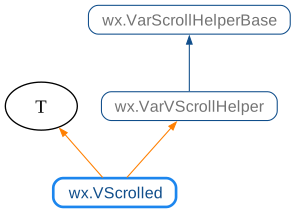
 Class Hierarchy
 Methods Summary
Default constructor, you must call |
|
Same as the non-default constructor, but returns a status code: |
 Class API
- class wx.VScrolled(T, VarVScrollHelper)
Possible constructors:
VScrolled() -> None

VScrolled(parent, id=ID_ANY, pos=DefaultPosition, size=DefaultSize,
          style=0, name=PanelNameStr) -> None
In the name of this class, “V” may stand for “variable” because it can be used for scrolling rows of variable heights; “virtual”, because it is not necessary to know the heights of all rows in advance only those which are shown on the screen need to be measured; or even “vertical”, because this class only supports scrolling vertically.
Methods
- __init__(self, *args, **kw)
 Overloaded Implementations:
__init__ (self)
Default constructor, you must call
Createlater.- Return type:
None
__init__ (self, parent, id=ID_ANY, pos=DefaultPosition, size=DefaultSize, style=0, name=PanelNameStr)
This is the normal constructor, no need to call
Createafter using this constructor.- Parameters:
parent (wx.Window) – The parent window, must not be nullptr.
id (wx.WindowID) – The identifier of this window,
wx.ID_ANYby default.pos (wx.Point) – The initial window position.
size (wx.Size) – The initial window size.
style (long) – The window style. There are no special style bits defined for this class.
name (string) – The name for this window; usually not used.
- Return type:
None
Note
VSCROLLis always automatically added to the style, there is no need to specify it explicitly.
- Create(self, parent, id=ID_ANY, pos=DefaultPosition, size=DefaultSize, style=0, name=PanelNameStr)
Same as the non-default constructor, but returns a status code:
Trueif ok,Falseif the window couldn’t be created.Just as with the constructor, the
VSCROLLstyle is always used, there is no need to specify it explicitly.
