
 wx.StdDialogButtonSizer
This class creates button layouts which conform to the standard button spacing and ordering defined by the platform or toolkit’s user interface guidelines (if such things exist).
By using this class, you can ensure that all your standard dialogs look correct on all major platforms. Currently it conforms to the Windows, GTK+ and macOS human interface guidelines.
When there aren’t interface guidelines defined for a particular platform or toolkit, wx.StdDialogButtonSizer reverts to the Windows implementation.
To use this class, first add buttons to the sizer by calling wx.StdDialogButtonSizer.AddButton (or wx.StdDialogButtonSizer.SetAffirmativeButton , wx.StdDialogButtonSizer.SetNegativeButton or wx.StdDialogButtonSizer.SetCancelButton ) and then call Realize in order to create the actual button layout used. Other than these special operations, this sizer works like any other sizer.
If you add a button with wx.ID_SAVE, on macOS the button will be renamed to “Save” and the wx.ID_NO button will be renamed to “Don’t Save” in accordance with the macOS Human Interface Guidelines.
See also
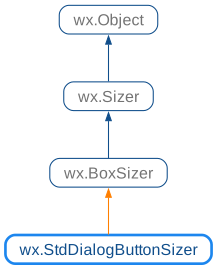
 Class Hierarchy
 Methods Summary
Constructor for a wx.StdDialogButtonSizer. |
|
Adds a button to the wx.StdDialogButtonSizer. |
|
Implements the calculation of a box sizer’s minimal. |
|
Returns the affirmative button for the sizer. |
|
Returns the apply button for the sizer. |
|
Returns the cancel button for the sizer. |
|
Returns the help button for the sizer. |
|
Returns the negative button for the sizer. |
|
Rearranges the buttons and applies proper spacing between buttons to make them match the platform or toolkit’s interface guidelines. |
|
Method which must be overridden in the derived sizer classes. |
|
Sets the affirmative button for the sizer. |
|
Sets the cancel button for the sizer. |
|
Sets the negative button for the sizer. |
 Properties Summary
See |
|
See |
|
See |
|
See |
 Class API
- class wx.StdDialogButtonSizer(BoxSizer)
Possible constructors:
StdDialogButtonSizer() -> None
This class creates button layouts which conform to the standard button spacing and ordering defined by the platform or toolkit’s user interface guidelines (if such things exist).
Methods
- __init__(self)
Constructor for a wx.StdDialogButtonSizer.
- Return type:
None
- AddButton(self, button)
Adds a button to the wx.StdDialogButtonSizer.
The button must have one of the following identifiers:
wx.ID_OKwx.ID_YESwx.ID_SAVEwx.ID_APPLYwx.ID_CLOSEwx.ID_NOwx.ID_CANCELwx.ID_HELPwx.ID_CONTEXT_HELP
- Parameters:
button (wx.Button)
- Return type:
None
- CalcMin(self)
Implements the calculation of a box sizer’s minimal.
It is used internally only and must not be called by the user. Documented for information.
- Return type:
- GetAffirmativeButton(self)
Returns the affirmative button for the sizer.
Affirmative buttons are those added with
IDID_OK,ID_YESorID_SAVE. They can have otherIDif they were added callingwx.StdDialogButtonSizer.SetAffirmativeButton.- Return type:
- GetApplyButton(self)
Returns the apply button for the sizer.
Apply buttons are those added with
IDID_APPLY.- Return type:
- GetCancelButton(self)
Returns the cancel button for the sizer.
Cancel buttons are those added with
IDID_CANCELorID_CLOSE. They can have otherIDif they were added callingwx.StdDialogButtonSizer.SetCancelButton.- Return type:
- GetHelpButton(self)
Returns the help button for the sizer.
Help buttons are those added with
IDID_HELPorID_CONTEXT_HELP.- Return type:
- GetNegativeButton(self)
Returns the negative button for the sizer.
Negative buttons are those added with
IDID_NO. They can have otherIDif they were added callingwx.StdDialogButtonSizer.SetNegativeButton.- Return type:
- Realize(self)
Rearranges the buttons and applies proper spacing between buttons to make them match the platform or toolkit’s interface guidelines.
- Return type:
None
- RepositionChildren(self, minSize)
Method which must be overridden in the derived sizer classes.
The implementation should reposition the children using the current total size available to the sizer (
m_size) and the size computed by the last call toCalcMin.- Parameters:
minSize (wx.Size)
- Return type:
None
Added in version 4.1/wxWidgets-3.1.3: , before this version RecalcSizes() method not taking any arguments had to be overridden in the derived classes instead.
- SetAffirmativeButton(self, button)
Sets the affirmative button for the sizer.
This allows you to use identifiers other than the standard identifiers outlined above.
- Parameters:
button (wx.Button)
- Return type:
None
- SetCancelButton(self, button)
Sets the cancel button for the sizer.
This allows you to use identifiers other than the standard identifiers outlined above.
- Parameters:
button (wx.Button)
- Return type:
None
- SetNegativeButton(self, button)
Sets the negative button for the sizer.
This allows you to use identifiers other than the standard identifiers outlined above.
- Parameters:
button (wx.Button)
- Return type:
None
Properties
- AffirmativeButton
- ApplyButton
See
GetApplyButton
- CancelButton
See
GetCancelButtonandSetCancelButton
- HelpButton
See
GetHelpButton
- NegativeButton
See
GetNegativeButtonandSetNegativeButton
