
 wx.FileConfig
wx.FileConfig implements wx.ConfigBase interface for storing and retrieving configuration information using plain text files.
The files have a simple format reminiscent of Windows INI files with lines of the form "key = value" defining the keys and lines of special form "[group]" indicating the start of each group.
This class is used by default for Config on Unix platforms but may also be used explicitly if you want to use files and not the registry even under Windows.
Configuration Files Paths
The default path for local (or user) configuration file is ~/.appname , i.e. it is stored directly in the user home directory. This default path is backwards-compatible but not recommended any more and it is advised to call wx.StandardPaths.SetFileLayout with wx.StandardPaths.FileLayout_XDG parameter to change the default path to ~/.config/appname.conf . MigrateLocalFile may be helpful for moving the existing configuration file to the new location. Alternatively, it is possible to specify CONFIG_USE_XDG flag in the style parameter of the constructor to use this XDG-compliant path without changing the global file layout. And for the programs using multiple configuration files it is recommended to use both CONFIG_USE_XDG and CONFIG_USE_SUBDIR which change the default file path to ~/.config/appname/appname.conf – and allow the program to store other files in the same ~/.config/appname directory.
See also
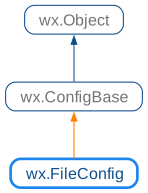
 Class Hierarchy
 Methods Summary
Constructor allowing to choose the file names to use. |
|
Delete the whole underlying object (disk file, registry key, …). |
|
Deletes the specified entry and the group it belongs to if it was the last key in it and the second parameter is |
|
Delete the group (with all subgroups). |
|
Prevent this object from saving data to the disk file when it is destroyed. |
|
Enables saving data to the disk file when this object is destroyed. |
|
Permanently writes all changes (otherwise, they’re only written from object’s destructor). |
|
Get number of entries in the current group. |
|
Get number of entries/subgroups in the current group, with or without its subgroups. |
|
Retrieve the current path (always as absolute path). |
|
Move the existing configuration file to a new location. |
|
Renames an entry in the current group. |
|
Renames a subgroup of the current group. |
|
Saves all config data to the given stream, returns |
|
Set current path: if the first character is ‘/’, it is the absolute path, otherwise it is a relative path. |
|
Allows setting the mode to be used for the config file creation. |
 Properties Summary
 Class API
- class wx.FileConfig(ConfigBase)
Possible constructors:
FileConfig(appName='', vendorName='', localFilename='',
           globalFilename='', style=CONFIG_USE_LOCAL_FILE|CONFIG_USE_GLOBAL_FILE)
           -> None

FileConfig(_is) -> None
FileConfig implements ConfigBase interface for storing and retrieving configuration information using plain text files.
Methods
- __init__(self, *args, **kw)
 Overloaded Implementations:
__init__ (self, appName=’’, vendorName=’’, localFilename=’’, globalFilename=’’, style=CONFIG_USE_LOCAL_FILE|CONFIG_USE_GLOBAL_FILE)
Constructor allowing to choose the file names to use.
If localFilename and/or globalFilename are explicitly specified, they are used as the names of the user and system-wide configuration files (the latter is only read by the program while the former is read from and written to). Otherwise the behaviour depends on style parameter. If it includes
CONFIG_USE_LOCAL_FILE, then the local file name is constructed from the information in appName and vendorName arguments in a system-dependent way. IfCONFIG_USE_GLOBAL_FILEis not specified at all (and globalFilename is empty) then the system-wide file is not used at all. Otherwise its name and path are also constructed in the way appropriate for the current platform from the application and vendor names.- Parameters:
appName (string)
vendorName (string)
localFilename (string)
globalFilename (string)
style (long)
- Return type:
None
__init__ (self, _is)
Read the config data from the specified stream instead of the associated file, as usual.
- Parameters:
is (wx.InputStream)
- Return type:
None
See also
- DeleteAll(self)
Delete the whole underlying object (disk file, registry key, …).
Primarily for use by uninstallation routine.
- Return type:
bool
- DeleteEntry(self, key, bDeleteGroupIfEmpty=True)
Deletes the specified entry and the group it belongs to if it was the last key in it and the second parameter is
True.- Parameters:
key (string)
bDeleteGroupIfEmpty (bool)
- Return type:
bool
- DeleteGroup(self, key)
Delete the group (with all subgroups).
If the current path is under the group being deleted it is changed to its deepest still existing component. E.g. if the current path is
"/A/B/C/D"and the groupCis deleted, the path becomes"/A/B".- Parameters:
key (string)
- Return type:
bool
- DisableAutoSave(self)
Prevent this object from saving data to the disk file when it is destroyed.
By default, changes to this object are only saved permanently when
Flushis explicitly called or when it is destroyed. If this method is called,Flushwon’t be called automatically from the destructor, meaning that any non-explicitly-flushed changes will be lost.- Return type:
None
Added in version 4.1/wxWidgets-3.1.3.
- EnableAutoSave(self)
Enables saving data to the disk file when this object is destroyed.
This is the default behaviour and this function doesn’t need to be called explicitly unless
DisableAutoSavehad been previously called.- Return type:
None
Added in version 4.1/wxWidgets-3.1.3.
- Flush(self, bCurrentOnly=False)
Permanently writes all changes (otherwise, they’re only written from object’s destructor).
- Parameters:
bCurrentOnly (bool)
- Return type:
bool
- static GetGlobalFileName(szFile)
- Parameters:
szFile (string)
- Return type:
str
- static GetLocalFileName(szFile, style=0)
- Parameters:
szFile (string)
style (int)
- Return type:
str
- GetNumberOfEntries(self, bRecursive=False)
Get number of entries in the current group.
- Parameters:
bRecursive (bool)
- Return type:
int
- GetNumberOfGroups(self, bRecursive=False)
Get number of entries/subgroups in the current group, with or without its subgroups.
- Parameters:
bRecursive (bool)
- Return type:
int
- GetPath(self)
Retrieve the current path (always as absolute path).
- Return type:
str
- HasEntry(self, strName)
- Parameters:
strName (string)
- Return type:
bool
- Returns:
Trueif the entry by this name exists.
- HasGroup(self, strName)
- Parameters:
strName (string)
- Return type:
bool
- Returns:
Trueif the group by this name exists.
- static MigrateLocalFile(name, newStyle, oldStyle=CONFIG_USE_HOME)
Move the existing configuration file to a new location.
This function is useful for moving legacy configuration files in
~/.appnameor~/.appname/appname.confto the XDG-compliant location under~/.config. To do this, simply specifyCONFIG_USE_XDGas part of newStyle.The returned wx.FileConfig.MigrationResult object describes what, if anything, was done: if its
oldPathmember is empty, it means that the file corresponding to oldStyle was not found and nothing was done. Otherwise, if itserrormember is empty, the old file was found and moved tonewPath. And iferroris not empty, it contains the user-readable error message describing why moving the file failed.Typical example of using this function is shown in the widgets sample:
- Parameters:
name (string) – Name of the configuration file.
newStyle (int) – Style which is used by the current version of the program, typically including
CONFIG_USE_XDGand possibly also includingCONFIG_USE_SUBDIR.oldStyle (int) – Style which was used by the previous versions of the program, possibly including
CONFIG_USE_SUBDIRand typically includingCONFIG_USE_HOME.
- Return type:
Added in version 4.3/wxWidgets-3.3.0.
- RenameEntry(self, oldName, newName)
Renames an entry in the current group.
The entries names (both the old and the new one) shouldn’t contain backslashes, i.e. only simple names and not arbitrary paths are accepted by this function.
- Parameters:
oldName (string)
newName (string)
- Return type:
bool
- Returns:
Falseif oldName doesn’t exist or if newName already exists.
- RenameGroup(self, oldName, newName)
Renames a subgroup of the current group.
The subgroup names (both the old and the new one) shouldn’t contain backslashes, i.e. only simple names and not arbitrary paths are accepted by this function.
- Parameters:
oldName (string)
newName (string)
- Return type:
bool
- Returns:
Falseif oldName doesn’t exist or if newName already exists.
- Save(self, os)
Saves all config data to the given stream, returns
Trueif data was saved successfully orFalseon error.- Return type:
bool
- SetPath(self, strPath)
Set current path: if the first character is ‘/’, it is the absolute path, otherwise it is a relative path.
‘..’ is supported. If strPath doesn’t exist, it is created.
- Parameters:
strPath (string)
- Return type:
None
See also
- SetUmask(self, mode)
Allows setting the mode to be used for the config file creation.
For example, to create a config file which is not readable by other users (useful if it stores some sensitive information, such as passwords), you could use
SetUmask(0077).This function doesn’t do anything on non-Unix platforms.
- Parameters:
mode (int)
- Return type:
None
See also
CHANGE_UMASK
Properties
- NumberOfEntries
- NumberOfGroups
