
 wx.DirDialog
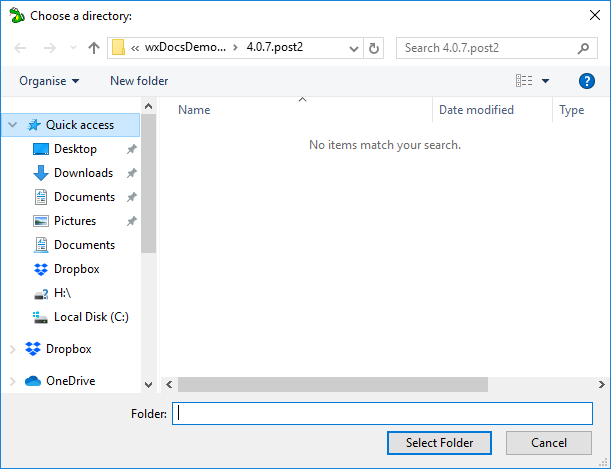
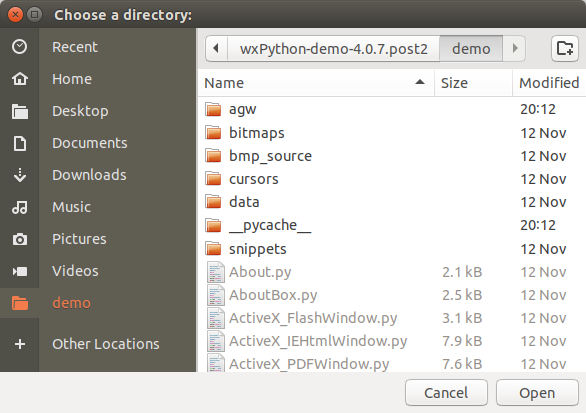
This class represents the directory chooser dialog.
 Window Styles
This class supports the following styles:
wx.DD_DEFAULT_STYLE: Equivalent to a combination ofDEFAULT_DIALOG_STYLEandRESIZE_BORDER.wx.DD_DIR_MUST_EXIST: The dialog will allow the user to choose only an existing folder. When this style is not given, a “Create new directory” button is added to the dialog or some other way is provided to the user to type the name of a new folder.wx.DD_CHANGE_DIR: Change the current working directory to the directory chosen by the user. This flag cannot be used with theDD_MULTIPLEstyle.wx.DD_MULTIPLE: Allow the user to select multiple directories. This flag is only available since wxWidgets 3.1.4.wx.DD_SHOW_HIDDEN: Show hidden and system folders. This flag is only available since wxWidgets 3.1.4.
Note
macOS 10.11+ does not display a title bar on the dialog. Use SetMessage to change the string displayed to the user at the top of the dialog after creation. The SetTitle method is provided for compatibility with pre-10.11 macOS versions that do still support displaying the title bar.
See also
DirDialog Overview, wx.DirSelector , wx.DirPickerCtrl, wx.FileDialog
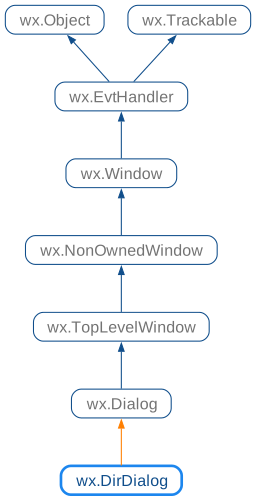
 Class Hierarchy
 Control Appearance

 Methods Summary
Constructor. |
|
Returns the message that will be displayed on the dialog. |
|
Returns the default or user-selected path. |
|
Returns a list of the currently selected paths. |
|
Sets the message that will be displayed on the dialog. |
|
Sets the default path. |
|
Shows the dialog, returning |
 Properties Summary
See |
|
See |
 Class API
- class wx.DirDialog(Dialog)
Possible constructors:
DirDialog(parent, message=DirSelectorPromptStr, defaultPath='',
          style=DD_DEFAULT_STYLE, pos=DefaultPosition, size=DefaultSize,
          name=DirDialogNameStr) -> None
This class represents the directory chooser dialog.
Methods
- __init__(self, parent, message=DirSelectorPromptStr, defaultPath='', style=DD_DEFAULT_STYLE, pos=DefaultPosition, size=DefaultSize, name=DirDialogNameStr)
Constructor.
Use
ShowModalto show the dialog.- Parameters:
parent (wx.Window) – Parent window.
message (string) – Message to show on the dialog.
defaultPath (string) – The default path, or the empty string.
style (long) – The dialog style, see
DD_*styles for more info.pos (wx.Point) – Dialog position. Ignored under Windows.
size (wx.Size) – Dialog size. Ignored under Windows.
name (string) – The dialog name, not used.
- Return type:
None
- CreateAccessible(self)
- Return type:
- static GetClassDefaultAttributes(variant=WINDOW_VARIANT_NORMAL)
- Parameters:
variant (WindowVariant)
- Return type:
- GetMessage(self)
Returns the message that will be displayed on the dialog.
- Return type:
str
- GetPath(self)
Returns the default or user-selected path.
- Return type:
str
Note
This function can’t be used with dialogs which have the
DD_MULTIPLEstyle, useGetPathsinstead.
- GetPaths(self)
Returns a list of the currently selected paths.
- Return type:
List[str]
- SetMessage(self, message)
Sets the message that will be displayed on the dialog.
- Parameters:
message (string)
- Return type:
None
- SetPath(self, path)
Sets the default path.
- Parameters:
path (string)
- Return type:
None
- ShowModal(self)
Shows the dialog, returning
ID_OKif the user pressedwx.OK, andID_CANCELotherwise.- Return type:
int
Properties
- Message
See
GetMessageandSetMessage
