
 wx.Cursor
A cursor is a small bitmap used for denoting where the mouse pointer is, with a picture that indicates the point of a mouse click.
A cursor may be associated either with the given window (and all its children, unless any of them defines its own cursor) using wx.Window.SetCursor , or set globally using wx.SetCursor . It is also common to temporarily change the cursor to a “busy cursor” indicating that some lengthy operation is in progress and wx.BusyCursor can be used for this.
Because a custom cursor of a fixed size would look either inappropriately big in standard resolution or too small in high resolution, wx.CursorBundle class allows to define a set of cursors of different sizes, letting wxWidgets to automatically select the most appropriate one for the current resolution and user’s preferred cursor size. Using this class with wx.Window.SetCursorBundle is the recommended way to use custom cursors.
Creating a Custom Cursor
The following is an example of creating a cursor from 32x32 bitmap data (down_bits) and a mask (down_mask) where 1 is black and 0 is white for the bits, and 1 is opaque and 0 is transparent for the mask. It works on Windows and GTK+.
down_bits = [255, 255, 255, 255, 31,
             255, 255, 255, 31, 255, 255, 255, 31, 255, 255, 255,
             31, 255, 255, 255, 31, 255, 255, 255, 31, 255, 255,
             255, 31, 255, 255, 255, 31, 255, 255, 255, 25, 243,
             255, 255, 19, 249, 255, 255, 7, 252, 255, 255, 15, 254,
             255, 255, 31, 255, 255, 255, 191, 255, 255, 255, 255,
             255, 255, 255, 255, 255, 255, 255, 255, 255, 255, 255,
             255, 255, 255, 255, 255, 255, 255, 255, 255, 255, 255,
             255, 255, 255, 255, 255, 255, 255, 255, 255, 255, 255,
             255, 255, 255, 255, 255, 255, 255, 255, 255, 255, 255,
             255, 255, 255, 255, 255, 255, 255, 255, 255, 255, 255,
             255, 255, 255, 255, 255, 255, 255, 255, 255, 255, 255,
             255]

down_mask = [240, 1, 0, 0, 240, 1,
             0, 0, 240, 1, 0, 0, 240, 1, 0, 0, 240, 1, 0, 0, 240, 1,
             0, 0, 240, 1, 0, 0, 240, 1, 0, 0, 255, 31, 0, 0, 255,
             31, 0, 0, 254, 15, 0, 0, 252, 7, 0, 0, 248, 3, 0, 0,
             240, 1, 0, 0, 224, 0, 0, 0, 64, 0, 0, 0, 0, 0, 0, 0, 0,
             0, 0, 0, 0, 0, 0, 0, 0, 0, 0, 0, 0, 0, 0, 0, 0, 0, 0,
             0, 0, 0, 0, 0, 0, 0, 0, 0, 0, 0, 0, 0, 0, 0, 0, 0, 0,
             0, 0, 0, 0, 0, 0, 0, 0, 0, 0, 0, 0, 0, 0, 0, 0, 0, 0,
             0, 0, 0, 0, 0]

if wx.Platform == '__WXMSW__':

    down_bitmap = wx.BitmapFromBits(down_bits, 32, 32)
    down_mask_bitmap = wx.BitmapFromBits(down_mask, 32, 32)

    down_bitmap.SetMask(wx.Mask(down_mask_bitmap))
    down_image = down_bitmap.ConvertToImage()
    down_image.SetOption(wx.IMAGE_OPTION_CUR_HOTSPOT_X, 6)
    down_image.SetOption(wx.IMAGE_OPTION_CUR_HOTSPOT_Y, 14)
    down_cursor = wx.Cursor(down_image)

elif wx.Platform == '__WXGTK__':

    down_cursor = wx.Cursor(down_bits, 32, 32, 6, 14,
                            down_mask, wx.WHITE, wx.BLACK)
See also
wx.Bitmap, wx.Icon, wx.Window.SetCursor , wx.SetCursor , wx.StockCursor
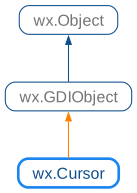
 Class Hierarchy
 Methods Summary
Default constructor. |
|
Get the handle for the Cursor. Windows only. |
|
Returns the coordinates of the cursor hot spot. |
|
Returns |
|
Set the handle to use for this Cursor. Windows only. |
|
For internal use only. |
 Properties Summary
See |
 Class API
- class wx.Cursor(GDIObject)
Possible constructors:
Cursor() -> None

Cursor(bitmap, hotSpotX=0, hotSpotY=0) -> None

Cursor(bitmap, hotSpot) -> None

Cursor(cursorName, type=BITMAP_TYPE_ANY, hotSpotX=0, hotSpotY=0) -> None

Cursor(name, type, hotSpot) -> None

Cursor(cursorId) -> None

Cursor(image) -> None

Cursor(cursor) -> None
A cursor is a small bitmap used for denoting where the mouse pointer is, with a picture that indicates the point of a mouse click.
Methods
- __init__(self, *args, **kw)
 Overloaded Implementations:
__init__ (self)
Default constructor.
- Return type:
None
__init__ (self, bitmap, hotSpotX=0, hotSpotY=0)
Constructs a cursor from the provided bitmap and hotspot position.
- Parameters:
bitmap (wx.Bitmap) – The bitmap to use for the cursor, should be valid.
hotSpotX (int) – Hotspot x coordinate (relative to the top left of the image).
hotSpotY (int) – Hotspot y coordinate (relative to the top left of the image).
- Return type:
None
Added in version 4.3/wxWidgets-3.3.0.
__init__ (self, bitmap, hotSpot)
This is an overloaded member function, provided for convenience. It differs from the above function only in what argument(s) it accepts.
Added in version 4.3/wxWidgets-3.3.0.
__init__ (self, cursorName, type=BITMAP_TYPE_ANY, hotSpotX=0, hotSpotY=0)
Constructs a cursor by passing a string resource name or filename.
The arguments hotSpotX and hotSpotY are only used when there’s no hotspot info in the resource/image-file to load (e.g. when using
BITMAP_TYPE_ICOunder wxMSW orBITMAP_TYPE_XPMunder wxGTK).- Parameters:
cursorName (string) – The name of the resource or the image file to load.
type (BitmapType) – Icon type to load. It defaults to
CURSOR_DEFAULT_TYPE, which is a #define associated to different values on different platforms:under Windows, it defaults to
BITMAP_TYPE_CUR_RESOURCE. Other permitted types under Windows areBITMAP_TYPE_CUR(to load a cursor from a .cur cursor file),BITMAP_TYPE_ICO(to load a cursor from a .ico icon file) andBITMAP_TYPE_ANI(to load a cursor from a .ani icon file).under MacOS, it defaults to
BITMAP_TYPE_MACCURSOR_RESOURCE; when specifying a string resource name, first aPNGand then aCURimage is searched in resources.under GTK, it defaults to
BITMAP_TYPE_XPM. See the wx.Cursor constructor for more info.under X11, it defaults to
BITMAP_TYPE_XPM.
hotSpotX (int) – Hotspot x coordinate (relative to the top left of the image).
hotSpotY (int) – Hotspot y coordinate (relative to the top left of the image).
- Return type:
None
__init__ (self, name, type, hotSpot)
This is an overloaded member function, provided for convenience. It differs from the above function only in what argument(s) it accepts.
- Parameters:
name (string)
type (BitmapType)
hotSpot (wx.Point)
- Return type:
None
Added in version 4.3/wxWidgets-3.3.0.
__init__ (self, cursorId)
Constructs a cursor using a cursor identifier.
- Parameters:
cursorId (StockCursor) – A stock cursor identifier. See wx.StockCursor.
- Return type:
None
__init__ (self, image)
Constructs a cursor from a wx.Image.
If cursor are monochrome on the current platform, colors with the
RGBelements all greater than 127 will be foreground, colors less than this background. The mask (if any) will be used to specify the transparent area.In wxMSW the foreground will be white and the background black. If the cursor is larger than 32x32 it is resized.
In wxGTK, colour cursors and alpha channel are supported (starting from GTK+ 2.2). Otherwise the two most frequent colors will be used for foreground and background. In any case, the cursor will be displayed at the size of the image.
Under Mac (Cocoa), large cursors are supported.
Notice that the image can define the cursor hot spot. To set it you need to use
wx.Image.SetOptionwithIMAGE_OPTION_CUR_HOTSPOT_XorIMAGE_OPTION_CUR_HOTSPOT_Y, e.g.image.SetOption(wx.IMAGE_OPTION_CUR_HOTSPOT_X, hotSpotX) image.SetOption(wx.IMAGE_OPTION_CUR_HOTSPOT_X, hotSpotY)
- Parameters:
image (wx.Image)
- Return type:
None
__init__ (self, cursor)
Copy constructor, uses reference counting.
- Parameters:
cursor (wx.Cursor) – Pointer or reference to a cursor to copy.
- Return type:
None
- GetHandle(self)
Get the handle for the Cursor. Windows only.
- Return type:
int
- GetHotSpot(self)
Returns the coordinates of the cursor hot spot.
The hot spot is the point at which the mouse is actually considered to be when this cursor is used.
This method is currently implemented in wxMSW, wxGTK and wxOSX (since wxWidgets 3.3.0) and returns
wx.DefaultPositionin the other ports.- Return type:
Added in version 4.1/wxWidgets-3.1.0.
- IsOk(self)
Returns
Trueif cursor data is present.- Return type:
bool
- SetHandle(self, handle)
Set the handle to use for this Cursor. Windows only.
- Return type:
None
- __bool__(self)
- Return type:
bool
- __nonzero__(self)
- Return type:
bool
- _copyFrom(self, other)
For internal use only.
- Return type:
None
Properties
- HotSpot
See
GetHotSpot
